
Full Backup
What is a full backup?
Fundamentally, a full backup is a comprehensive backup variant that creates a complete and exact copy of your entire selected dataset at a single moment in time. Rather than filtering for recent changes, this approach captures every single file, repository, and data block across your protected environment in a single backup operation.
For instance, if you secure your DevOps infrastructure by running a full backup on a Saturday night, the system duplicates your entire codebase, project boards, and metadata into one comprehensive package. Should a critical server failure or ransomware attack happen on Tuesday, you can rely exclusively on that Saturday archive to recover your working environment in one seamless operation.
As a fundamental component of an overall disaster recovery plan, a full backup acts as your primary safety net. This article explains where full backups fit among other backup types, the trade-offs in storage use and backup windows, and how to plan retention, synthetic full and cumulative incremental backups, and reliable protection for DevOps SaaS environments.
Overview of backup types and data protection
All backup copy types are a reliable way to make sure your infrastructure is secure, but they function quite differently. Let’s have a closer look at how these three main approaches compare.
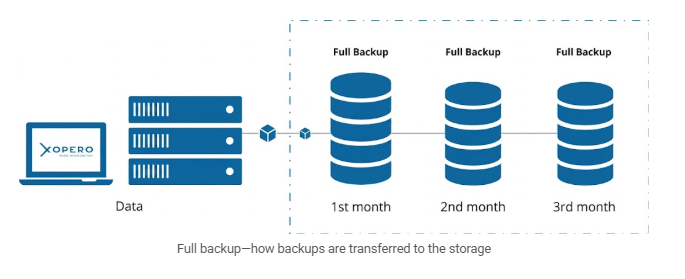
- Full Backup
A full backup copies the entire dataset. While this requires significant transfer time and storage space, it provides a complete, independent copy that ensures rapid and straightforward data recovery.
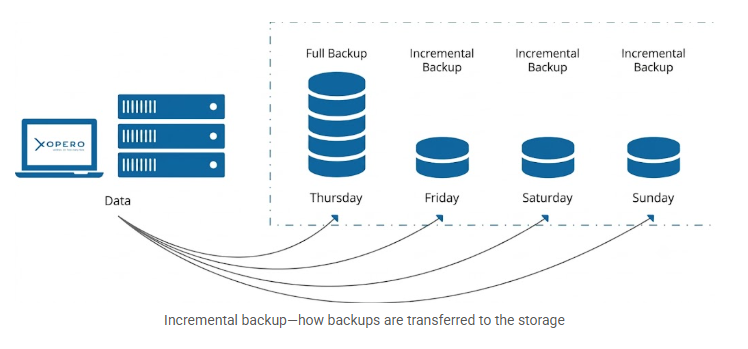
- Incremental Backup
Instead of moving all your data every day, an incremental backup targets only the changes made since your last run. While this keeps the incremental backup process fast and highly storage-efficient, recovery takes a bit longer. Your system must first restore the initial full backup and then each incremental copy one by one.
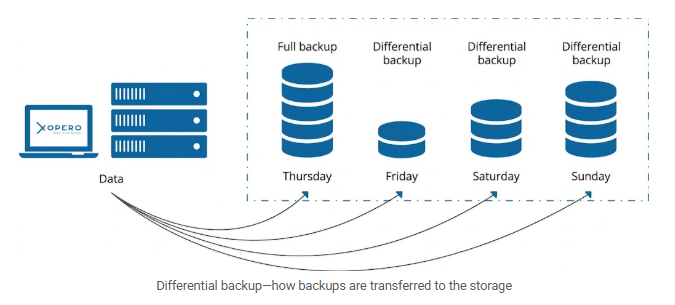
- Differential Backup
The differential backup strategy serves as a hybrid approach, balancing the benefits of full and incremental methods. The first copy is the full one. The second copy is similar to an incremental backup; it contains only the data that changed from the full backup. When it comes to subsequent copies, the reference is always the last full copy, not the previous differential one. It is worth noting that the popular GFS (Grandfather-Father-Son) rotation scheme combines all three of these backup types.
Choosing the right backup variant
Choosing the right backup strategy depends entirely on your specific operational needs. The table below offers a quick summary of the key differences:
| Backup variant | Recovery simplicity | Operational impact |
|---|---|---|
| Full Backup | High: Restoring data is straightforward because your entire working environment is contained within a single, independent file. | Constantly transferring all the data creates an enormous, slow backup window and consumes large amounts of repository storage capacity. |
| Differential Backup | Moderate: Requires assembling the initial full baseline along with the most recent differential file to execute a complete restore. | Offers a middle ground for transfer speeds, but file sizes grow progressively larger than incremental backup copies over the backup cycle. |
| Incremental Backup | Lower: Requires piecing together the initial full baseline and every subsequent incremental copy in the exact chronological chain. | Transfers only data modified since the last backup, reducing storage usage and data transfer times. For SaaS environments, this also minimizes API calls. |
Full Backups: Purpose and practical Use
To understand the purpose of a full backup, you simply need to look at its underlying mechanics. During a full backup operation, the system completely ignores whether a file was created yesterday, last week, or five years ago. Instead, it sweeps through your entire selected infrastructure, copying it into a complete data snapshot. By capturing every designated data file set, database, repository, and configuration item all at once, the system generates a comprehensive, self-contained data block that represents a snapshot of that exact moment.
Because of how they function, full backups come with a very distinct set of trade-offs:
| Advantages of full backups | Disadvantages of full backups |
|---|---|
|
Rapid, straightforward recovery Because all your required data is bundled into a single file, restoring your environment is incredibly fast and helps restore systems quickly after data loss. Your system doesn’t need to waste time computing or assembling multiple backup versions. |
High storage consumption Storing multiple complete copies of your entire dataset, day after day, quickly consumes massive amounts of repository storage capacity. |
|
Zero dependencies A full backup is entirely self-sufficient. Even if your older backup files are corrupted, lost, or deleted, your latest full backup will still execute a complete restore perfectly, unlike chained methods where damaged or missing backup files can contribute to failed recovery. |
Lengthy backup windows Constantly transferring your entire data volume takes significant time, which can create an enormous, slow backup timeframe that might overlap with active working hours. |
|
Simplified version management Managing your data retention policy is much easier when every restore point is just one independent package. |
Bandwidth and compute strain Moving all your infrastructure data at once places a heavy, sustained load on your network and server resources. |
A SaaS-focused full backup in action
Let’s imagine you are protecting your company’s Microsoft 365 or Jira Software environment. If you schedule a full backup for Friday evening, the backup application will meticulously copy every single user mailbox, every Jira issue, every attachment, and all your organizational metadata into one consolidated archive.
If a third-party integration glitches on Monday morning and accidentally wipes out a crucial project board, you don’t need to cross-reference multiple backup files to find the missing data. You simply select that Friday full backup, locate the specific board, and restore it directly from that single, comprehensive file to get your team working again instantly.
Backup strategy and retention planning
Before you can finalize any data protection strategy and formal backup plan, you must define two critical metrics: your Recovery Time Objective (RTO) and Recovery Point Objective (RPO).
- Recovery Point Objective (RPO)
This defines how much data you can afford to lose in the event of an outage, measured in time. If your RPO is four hours, you must run backups at least every four hours to ensure you never lose more than that specific window of work. - Recovery Time Objective (RTO)
This dictates how quickly your systems must be completely restored and back online after a disaster. It represents your maximum acceptable downtime.
The weekly full and daily incremental strategy
To balance strict RTO and RPO targets efficiently, the most practical approach is combining weekly full backups with daily incremental backups. Running a full backup over the weekend, when system activity and network traffic are typically lowest, establishes a fresh, comprehensive baseline. Then, running fast incremental backups throughout the workweek ensures you capture new daily modifications without placing a continuous, heavy strain on your bandwidth or repository storage capacity.
Designing retention tiers and cleanup rules
Storing every single full and incremental backup forever across your storage systems is neither cost-effective nor practical. Because these partial backups and full backups capture extensive data histories over time, you need a structured retention policy with automated cleanup rules. A standard tiered approach looks like this:
- Short-term retention: Keep daily incremental backups for 7 to 14 days. This covers immediate, day-to-day recovery needs, such as accidentally deleted pull requests or overwrites.
- Medium-term retention: Keep weekly full backups for 4 to 8 weeks. This protects your environment against silent data corruption or malicious scripts that might go unnoticed for several days.
- Long-term retention: Keep monthly full backups for 1 to 7 years, depending entirely on your specific industry requirements.
One backup copy should be kept offsite to protect against site-level disasters. The 3-2-1-1-0 rule requires at least three copies of data and helps protect against hardware failure and ransomware.
Once a backup file ages out of its designated tier, automated cleanup rules should immediately and permanently delete it to free up repository storage.
Aligning with SOC 2 and GDPR requirements
Your retention planning must also heavily factor in legal and compliance frameworks. If your organization requires SOC 2 compliance, auditors will expect to see a strictly documented, automated backup schedule that proves your infrastructure is both secure and rapidly recoverable.
Conversely, privacy regulations like GDPR mandate the “Right to be Forgotten.” Retaining a user’s personal data in your long-term monthly full backups for years after they have explicitly requested deletion can trigger severe compliance violations. Because of this, your retention tiers and automated cleanup rules must be meticulously aligned with your legal obligations, ensuring you do not hold onto sensitive data longer than legally permitted.
Synthetic fulls and cumulative incremental backups
As your DevOps environments and SaaS datasets scale, transferring massive amounts of data for a weekly full backup might eventually bottleneck your network. When this happens, advanced methods offer a smarter way to manage your infrastructure:
Synthetic full backups
A synthetic full backup delivers the fast-recovery benefits of a standard full backup, but completely eliminates the heavy network strain.
- How it works: Instead of copying your entire infrastructure directly from the source all over again, the backup server builds the new file internally. It merges your last existing full baseline with your recent incremental backups to “synthesize” a brand-new, independent restore point directly within the storage repository.
- When to use it: Implement synthetic fulls when your backup window is extremely tight or network bandwidth is restricted, but you still require the rapid, straightforward recovery speeds that only an independent full backup can provide.
Cumulative incremental backups
While standard incrementals only capture changes since the previous backup run, cumulative incrementals take a broader approach.
- How it works: They capture all data modified specifically since the last full baseline. As the week progresses, each file grows larger – Wednesday’s backup, for example, will contain all changes from Monday, Tuesday, and Wednesday in one consolidated package.
- The trade-off: While this requires slightly more storage capacity than standard incrementals, it drastically simplifies recovery. Your system only needs the initial full baseline and the single most recent cumulative file to completely restore your working environment.
How to estimate and manage your full backup window
Because a full backup moves a massive amount of data, its biggest operational hurdle is the backup window – the scheduled period during which your automated software secures data without interrupting active production environments or CI/CD pipelines.
If your full backup job bleeds into active production hours, it consumes massive network bandwidth, causes system latency, and slows down critical code deployments. The financial stakes of this disruption are exceptionally high:
- 90% of organizations lose over $300,000 per hour of downtime, according to the 2024 ITIC report.
- $4.88 million is the average cost of a data breach, according to the IBM Cost of a Data Breach Report.
Estimating your transfer time
To ensure your full backup doesn’t crash your daily workflows, you must accurately calculate how long it will take to run. Here is the standard approach to estimating your required timeframe:
- Calculate raw transfer time: Divide your total estimated backup data size by your network’s actual upload speed.
- Add a safety buffer: Always factor in a 20-30% time margin to safely absorb unexpected network latency, API rate limits (from platforms like GitHub or Microsoft 365), and natural data growth.
Choosing Your Backup Window Strategy
In modern IT environments, global DevOps pipelines operate 24/7, meaning there is often no true “nighttime” or low-traffic period during the workweek. To strike the right balance between performance and data protection, organizations typically split their strategy:
| Schedule Strategy | Best use case | Operational impact |
|---|---|---|
| The weekend window (hours/days) | Running complete infrastructure copies and full baseline backups. | By dedicating Saturday or Sunday to heavy data transfers, you migrate huge volumes to long-term storage without impacting active business operations or disrupting global developers. |
| The micro-window (minutes) | Running automated incremental backups throughout the workweek. | Relies on your weekend baseline to capture daily commits and CI/CD changes frequently, without freezing development or choking network bandwidth. |
Advanced considerations and best practices
Establishing a reliable full backup routine is only the first step. To guarantee your complete data backup and disaster recovery process holds up during an actual crisis, you must actively maintain it. Here are the core practices to keep your environment secure:
| Best Practice | Operational Impact |
|---|---|
| Verify backup integrity | A backup is completely useless if the file is corrupted. Schedule routine verification jobs to automatically test your full backups, ensuring the data is intact and genuinely capable of executing a successful restore. |
| Break long incremental chains | If a single file in a long incremental chain goes missing or corrupts, every backup taken after it is instantly rendered unrecoverable. Mitigate this by regularly injecting new full or synthetic full backups to establish a fresh baseline. |
| Monitor your backup windows | As your organizational data scales, transfer times will inevitably increase. Continuously monitor your operations and adjust schedules so heavy data transfers do not bleed into active working hours and throttle network performance. |
| Implement strict RBAC | Your backup repositories hold a perfect replica of your company’s most sensitive data. Enforce Role-Based Access Control so only heavily vetted personnel can modify configurations, execute restores, or delete aging data blocks. |
Related terms
- GFS (Grandfather-Father-Son) Rotation
A rotation strategy for long-term data retention that saves storage space. It combines all three backup types into a single schedule: daily incrementals (Son), weekly differentials (Father), and monthly full backups (Grandfather). - RPO (Recovery Point Objective)
A metric that defines the maximum amount of data your business can afford to lose during an outage. - Incremental Backup
Incremental backup is a data protection strategy that captures the files, repositories, or data blocks that have been created or modified since the last backup operation. - Differential Backup
A backup that captures all data modified since your last full backup. Unlike incremental copies that only look at the previous run, this method always goes back to the original full baseline. - Backup Window
The defined hours during which backup operations are permitted to run. To ensure zero impact on production workloads, any backup task that exceeds this allowed timeframe is automatically stopped and marked as failed. Tasks cannot be started or resumed outside of this designated window.