
Incremental backup
What is an incremental backup?
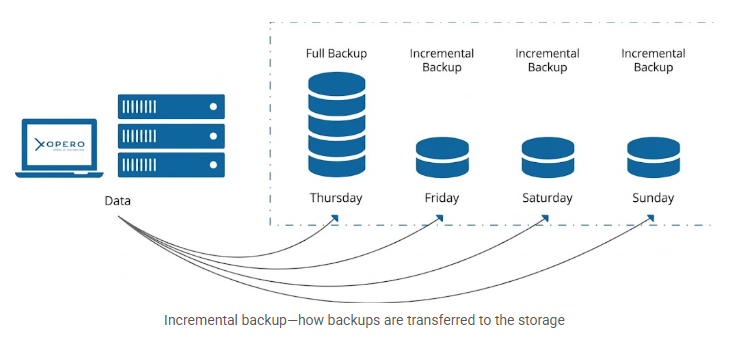
At its core, an incremental backup is a data protection strategy that captures the files, repositories, or data blocks that have been created or modified since the last backup operation. Instead of copying the entire dataset each time, an incremental backup targets only the data modified since the prior backup.
To function correctly, an incremental backup chain relies on an initial full backup. Once this full baseline is established, you can run a series of incremental backups.
For example, if you protect your DevOps stack by scheduling an initial full backup on a Thursday, your subsequent backups on Friday, Saturday, and Sunday can run as incremental operations. Instead of copying your entire codebase every single day, each daily incremental backup simply captures the new commits and modifications made since the previous backup run.
💡 Restoring from an incremental chain is completely automated. Backup software handles the consolidation of all dependent versions in the background, meaning you simply select the point in time you want to recover.
Key benefits of incremental backups
Implementing an incremental backup strategy offers several advantages:
- Accelerated backup windows and lower bandwidth
Because incremental backups process only new or modified data, they execute significantly faster than full backups. - Optimized storage utilization
Backing up only modified data reduces repository storage consumption by eliminating redundant copies. - Lower RPO metrics
Frequent backups help organizations lower their RPO. A full backup with subsequent incremental backups ensures that all recent changes are captured. - Improved operational efficiency
Automated backup schedules maintain workflow continuity and reduce manual management for IT and development teams.
Incremental vs. differential vs. full backup types
All backup copy types are a reliable way to make sure your infrastructure is secure, but they function quite differently.
Let’s have a closer look at how these three main approaches compare.
Full Backup
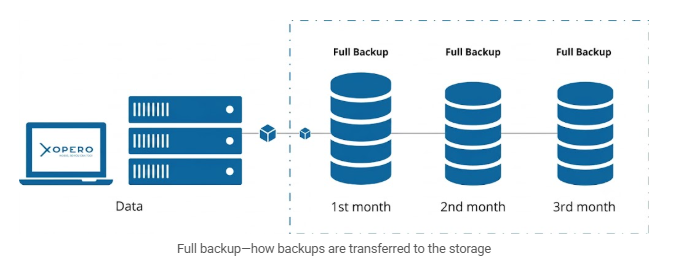
A full backup copies the entire dataset. While this requires significant transfer time and storage space, it provides a complete, independent copy that ensures rapid and straightforward data recovery.
Incremental Backup
As we explained above, instead of moving all your data every day, an incremental backup targets only the changes made since your last run. While this keeps the backup process fast and highly storage-efficient, recovery takes a bit longer. Your system must first restore the initial full copy and then each incremental copy one by one.
Differential Backup
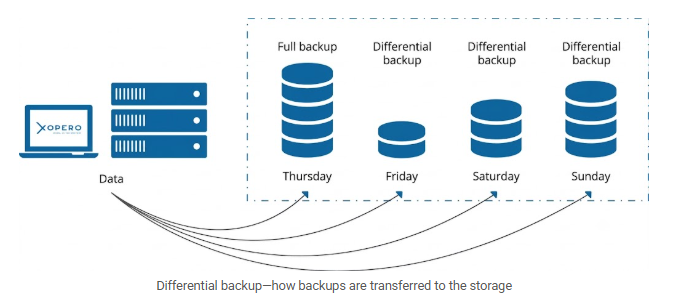
The differential backup strategy serves as a hybrid approach, balancing the benefits of full and incremental methods. The first copy is the full one. The second copy is similar to an incremental backup, it contains only the data that changed from the full backup. When it comes to subsequent copies, the reference is always the last full copy, not the previous differential one.
It is worth noting that the popular GFS (Grandfather-Father-Son) rotation scheme combines all three of these backup types.
Choosing the right backup copy type depends entirely on your specific operational needs. The table below offers a quick summary of the key differences:
| Full copy | Incremental copy | Differential copy | |
|---|---|---|---|
| Backup creation speed |
🔴 Slow (you copy everything) |
🟢 Very fast (only changes since the last backup) |
🟡 Moderate (changes since the last full backup) |
| Storage consumption |
🔴 High |
🟢 Minimal |
🟡 Moderate (increases with each subsequent backup) |
| Restore procedure |
🟢 Only the full copy |
🔴 Full copy + all incremental copies one by one |
🟡 Full copy + only the last differential copy |
| Recovery time (RTO) |
🟢 Shortest |
🔴 Longest (whole copy chain merge) |
🟡 Short (full copy and single differential copy merge) |
| Failure risk |
🟢 Low |
🔴 High (single copy failure in a chain renders remaining unusable) |
🟡 Moderate |
Types of incremental backup
The choice between different incremental methods depends on how they track modifications, structure your files, and handle the recovery phase.
Let’s look at the most common variants used to balance performance and storage.
- Block-level incremental backup
This method divides files into segments and transfers only the specific blocks containing changed data. - Byte-level incremental backup
This method tracks modifications at the individual byte level to minimize backup file sizes, though it requires more processing power to monitor changes at this granularity. - Forever incremental backup
This strategy follows a single initial full copy with indefinite incremental runs, which lowers network strain but causes storage consumption to continuously grow and lengthens the recovery process. - Synthetic full backup
The backup tool combines the previous full backup with subsequent incremental copies to construct an up-to-date full file, providing fast restoration without generating new network traffic. - Reverse incremental backup
This method injects new changes directly into the main backup file so the most recent copy is always a complete full backup, lowering recovery times at the expense of higher processing power during the backup process.
💡 While other vendors typically use a “forever incremental” model that leaves you with just one aging full backup and long dependency chains, GitProtect uses cyclical synthetic full backups. By periodically (e.g., monthly) generating a fresh baseline, GitProtect keeps your incremental chains short. This provides multiple complete restore points within your retention period, making your data recovery faster and more reliable.
Implementing an incremental backup strategy for DevOps
In DevOps environments, code commits and infrastructure updates occur continuously. Relying solely on full backups increases data loss exposure if a ransomware attack or corrupted deployment emerges between backup cycles.
Here is how an incremental approach addresses the limitations of a full-backup-only strategy:
| Full-backup-only challenges | The incremental backup solution |
|---|---|
| Relying on long backup cycles creates a high risk of losing days of development if an outage occurs. | Run frequent backups daily to capture new or modified data between your periodic full backups. |
| Constantly transferring all the data creates an enormous, slow backup window. | Transfer only data modified since the last backup, reducing file sizes and data volume. |
| Storing multiple full data copies consumes large amounts of repository storage capacity. | Reduce overall storage space usage while keeping your entire history intact. |
Best practices checklist for incremental backups
Standard practices for maintaining fast backup speeds and reliable data recovery include the following:
Related terms
- GFS (Grandfather-Father-Son) Rotation
A rotation strategy for long-term data retention that saves storage space. It combines all three backup types into a single schedule: daily incrementals (Son), weekly differentials (Father), and monthly full backups (Grandfather). - RPO (Recovery Point Objective)
A metric that defines the maximum amount of data your business can afford to lose during an outage. - Full Backup
A complete copy of your entire dataset. It takes the most time and storage space to create, but it makes data recovery fast and straightforward since everything you need is packed into a single file. - Differential Backup
A backup that captures all data modified since your last full backup. Unlike incremental copies that only look at the previous run, this method always goes back to the original full baseline. - Backup Window
The time period allocated for running backup operations. It is typically chosen in a way that minimizes or eliminates the impact on production workloads.