AI Security in DevOps: Best Practices to Follow

SUMMARY
- AI has lowered the barrier to entry for pipeline attacks to writing prompts in English, and reported AI-related incidents across major DevOps platforms grew 43% in the second half of 2025.
- The security posture built around human developers does not transfer to machine collaborators: AI agents act with inherited credentials, their code carries more defects, and they enter the environment faster than any inventory records them.
- Seven proactive practices close most of that gap: validating AI-generated code, controlling shadow AI, enforcing least privilege for agents, handling untrusted input, vetting the AI supply chain, protecting secrets, and monitoring every automated action.
- Because an autonomous agent completes damage faster than anyone can intervene, immutable backups stored outside your DevOps platform and tested point-in-time recovery are what turn a serious incident into a recoverable one.
Attacking a CI/CD pipeline used to require a specialist who understood Git internals, cloud identity, and the way build runners handle secrets. That is no longer true. The barrier to entry for an advanced attack has dropped to the level of writing prompts in English.
Automation itself is not new to DevOps, but AI has raised its ceiling on both sides of the fence. Language models tuned for offensive work circulate on dark web marketplaces and Telegram channels, with WormGPT and FraudGPT among the names most often cited.
They generate malware, write phishing emails, and analyze code for weaknesses. Specific services get shut down and replaced, and the underlying capability stays available to anyone with a payment method.
An attacker can now feed a workflow file to a model, ask it to locate secrets or draft a malicious pull request, and get back a clean, credible-looking fix. It sails through review. The pipeline runs, and the token leaks.
The numbers follow the economics. In 2025, we identified 68 AI-related incidents across the status pages of GitHub, GitLab, and Atlassian. Reported incidents grew from 28 in the first half of the year to 40 in the second, a 43% increase.
How AI Changes the DevOps Security Equation
AI earns its place in DevOps by making delivery faster. Your code gets written, reviewed, and shipped in less time, and routine work stops consuming your engineers’ attention. However, what often gets overlooked is that a security posture designed around human developers does not transfer cleanly to machine collaborators.
Three shifts explain most of the gap:
1. Autonomous agents act with real authority
An AI agent inside your pipeline holds credentials, calls tools, edits files, and opens pull requests. It does all of this at machine speed and across several systems at once, which leaves a much shorter window for anyone to notice a problem and step in.
2. AI-generated code carries more defects
CodeRabbit analyzed 470 open-source pull requests and found that AI-coauthored ones contained roughly 1.7 times more issues than human-written ones, with security vulnerabilities appearing 1.5 to 2 times more often. Your review process now absorbs more volume and a higher defect rate at the same time.
3. Shadow AI spreads faster than your inventory
Developers install assistants, extensions, and MCP servers on their own machines because those tools work. Each one reaches your source code, but none of them appears on your asset list.
Attackers take advantage of these shifts, but they rarely create the opening themselves. The initial doorway is almost always left open by human error.
| ⚠️ In July 2025, someone submitted a pull request to the Amazon Q Developer Extension carrying a prompt that told the AI assistant to wipe local systems and cloud resources. It was approved and merged without detection, and the compromised release reached the VS Code Marketplace, where it sat in front of close to a million users. AWS pulled the version and argued the injected command was malformed, though researchers disputed how harmless it really was. |
That said, two decisions account for much of this exposure: adopting AI tools nobody vetted, and granting agents wider permissions than their tasks require. Both create blind spots the moment they happen.
So, how can you protect your organization from AI-related data loss? The best practices below cover what you should adjust in your DevOps security posture.
Best practices that keep AI useful instead of dangerous
None of what follows asks you to slow AI adoption. It asks you to stop treating AI tools as features and start treating them as contributors with credentials, permissions, and an audit trail.
What is more, most of what you need is already running in your pipeline. It was built on the assumption that a human sits behind every commit, which is no longer true.
1. Validate AI-generated code with the security gates you already have
Your DevSecOps toolchain was built to catch bad code regardless of who wrote it. SAST, DAST, SCA, secret scanning, IaC scanning, SBOM generation, and mandatory human review all apply to AI output exactly as they apply to human output.
The problem is that AI-generated code often slips past the informal checks that sit in front of those gates. It compiles. It follows house conventions. Local tests come back green, because permissive configuration rarely throws an exception. A reviewer under time pressure sees clean formatting and reads it as care.
So the rule is simple: no exemptions and no fast lanes for machine-written changes. If anything, AI-coauthored pull requests deserve closer attention, since they arrive in higher volume and carry more defects per change.
What to put in place:
- Run SAST (Static Application Security Testing), SCA (Software Composition Analysis), secret scanning, and IaC (Infrastructure as Code) scanning on every branch, regardless of who authored it
- Run DAST (Dynamic Application Security Testing) against build artifacts before release
- Generate an SBOM (Software Bill of Materials) for each build so a compromised dependency can be traced later
- Confirm that every third-party package named in AI output actually exists and is the one you meant to pull
- Require a named human approver on every merge, with deeper review for authentication, IAM, cryptography, and infrastructure-as-code changes.
2. Control shadow AI across your DevOps environment
Shadow AI is what happens when tool adoption outpaces tool governance. Models, copilots, agents, MCP servers, plugins, and external APIs enter through individual developers rather than through procurement, and your records never catch up.
Treat it as a visibility problem rather than a discipline problem. The developers installing these tools are responding to real friction, and most of what they choose is genuinely useful. What is missing is any record of which services now reach your source code and where that code goes once it leaves your perimeter.
Everything downstream depends on closing that gap. You cannot patch what you have not catalogued, assess a vendor you did not know was used, or run AI security posture management against an unknown asset base. When a disclosure lands against a widely deployed coding assistant, the inventory turns a week of investigation into an afternoon.
Pair the inventory with an approval route quick enough that developers use it. Otherwise, you get compliance on paper and shadow AI in practice.
What to put in place:
- Keep one inventory covering models, copilots, IDE assistants, autonomous agents, MCP servers, plugins, browser extensions, and external AI APIs.
- Name an owner and a review date for every entry.
- Record what data each tool can reach, where that data travels, and whether the vendor trains on it.
- Give developers a fast approval path, so asking beats installing.
- Audit what is genuinely connected: OAuth and installed apps on GitHub, GitLab, Azure DevOps, and Atlassian, plus IDE extensions on endpoints and MCP configuration in repositories.
- Watch outbound traffic from build agents and developer machines for calls to AI services you never approved.
| 👉 An approved-tools list that nobody can add to becomes fiction within a month. Measure how long a tool request takes to approve, and treat a slow answer as a security risk in its own right. |
3. Limit what an AI agent can reach when it goes wrong
Assume an agent will eventually do something you did not intend,whether it was manipulated or because it misunderstood the task. Its permissions decide how large that becomes.
| ⚠️ In April 2026, a Cursor agent working on a routine task in PocketOS’s staging environment hit a credential mismatch and decided to resolve it by deleting a production database volume. To carry that out, it searched the workspace, found an API token in a file unrelated to its task, and used it because that token’s permissions were broad enough to delete the volume. The deletion took nine seconds. The provider stored volume-level backups inside the same volume, so those were gone too, leaving a three-month-old copy as the most recent recoverable state. |
Scope compounds the problem when agents hold no identity of their own. Most run with the permissions of whoever invoked them, which means the practical blast radius is your most privileged developer’s access, not the task’s requirements.
What to put in place:
- Give every agent its own identity, never a shared service account or a developer’s personal token.
- Scope permissions to the specific repositories, branches, and projects the task requires.
- Issue short-lived, automatically rotated credentials instead of standing tokens.
- Require human approval for high-risk actions: merges to protected branches, production deployments, permission changes, and secret access.
- Prevent agents from modifying their own guardrails, including workflow definitions, approval settings, and IDE configuration files.
- Review agent permissions on a schedule and revoke them when a project ends.
| 💡 Guardrails an agent can edit are not guardrails. CVE-2025-53773 allowed an attacker to use prompt injection to switch GitHub Copilot into a mode that removed user confirmations entirely by having it write to the IDE’s own settings file. Microsoft patched it in August 2025 by requiring approval for security-relevant configuration changes. |
4. Protect against prompt injection and poisoned context
A language model cannot tell the difference between what you asked it to do and what it happened to read. Both arrive as text in the same context window. That single property is what makes prompt injection possible, and no amount of instruction tuning removes it.
The practical consequence for DevOps is a much wider definition of untrusted input. Issue titles, pull request bodies, commit messages, code comments, documentation pages, RAG sources, web content the agent fetched, and the output of any tool it called are all potential instruction carriers.
The PromptPwnd vulnerability class showed how this plays out inside pipelines. On AI-integrated GitHub Actions and GitLab workflows, raw user content was embedded into prompts without sanitization, and agents were pushed into executing privileged commands that leaked credentials, API keys, and cloud tokens.
It reaches beyond version control too. Cato Networks demonstrated an attack in June 2025 where an external, unauthenticated user submitted a Jira Service Management ticket containing an injection payload. An internal AI workflow connected through MCP processed the ticket, executed the instructions with the support engineer’s privileges, and returned tenant data into the attacker’s own ticket, with no internal access required at any point.
You cannot patch this behavior out of the model. You contain it by controlling what enters the context and what the agent can do once it is there.
What to put in place:
- Classify source code, issue titles and bodies, commit messages, documentation, RAG (Retrieval-Augmented Generation) content, fetched web pages, and tool outputs as untrusted.
- Never concatenate raw user content into a prompt; pass it as structured data with clear boundaries between instruction and content.
- Limit which tools an agent can call, so an injected instruction meets a permission wall rather than a shell.
- Require human approval before an agent acts on content that originated outside your organization.
- Treat model output as untrusted code, and scan it rather than executing it directly.
- Run adversarial tests in CI for injection, jailbreaks, and secret leakage, and repeat them when prompts or tools change.
| 👉 Prompt injection does not require access to your systems. It requires access to something your AI will read: a public issue, a support ticket, a README in a dependency, a page your agent fetches for context. |
5. Secure the AI supply chain before anything enters your workflow
You already vet dependencies. AI adds a new set of components that arrive with far less scrutiny: models, MCP servers, agent skills, IDE extensions, plugins, and third-party integrations. Each one gets access to your code, and most get installed by a single developer in a few seconds.
| ⚠️ The risk is not theoretical. At the end of 2025, researchers disclosed a vulnerability cluster called IDEsaster spanning major AI-powered IDEs and coding assistants, including GitHub Copilot, Cursor, Zed.dev, Roo Code, JetBrains Junie, Gemini CLI, and Claude Code. At least 24 CVEs were assigned and more than 30 vulnerabilities identified. The attacks chained prompt injection with misuse of agent tools and the IDE’s own features, reaching remote code execution and data exfiltration. ⚠️ Attackers also target what you pull in. In December 2025, a campaign reactivated dormant GitHub accounts, some idle for years, and published polished AI-generated projects — OSINT tools, DeFi bots, GPT wrappers, security utilities. Several reached GitHub’s trending lists. Only once the repositories had earned real traction did the operators add quiet “maintenance” commits carrying the PyStoreRAT backdoor, reaching IT administrators, security analysts, and OSINT researchers. → Learn how abandoned repositories are a potential data security gap |
That is why the version you reviewed and the version that reaches your pipeline need to be provably identical, and why adoption decisions deserve a systematic review rather than a one-time approval.
What to put in place:
- Vet models, MCP servers, plugins, skills, extensions, and AI integrations through the same review you apply to any third-party dependency.
- Pin versions and verify checksums or signatures rather than tracking the latest.
- Check provenance before adopting a repository, including maintainer history and how the project is actually used, not just star counts.
- Treat an MCP server as remote code with credentials, and review what it can reach.
- Run experimental AI projects in a sandbox, away from production credentials and source code.
- Record AI components in your SBOM, or an AIBOM (AI Bill of Materials), so an affected version can be traced after disclosure.
| 💡 An MCP server is not a plugin. It is remote code that holds credentials to your systems, and it deserves the same review you would give any service with that level of access. |
6. Keep secrets and source code out of AI systems
Every prompt is a transfer. Code, configuration, logs, and stack traces leave your perimeter and land in a system you do not operate, governed by terms someone may never have read. Whatever goes in gets stored somewhere, and some of it trains the next model version.
Secrets follow the same path. A developer pastes a config file to debug a connection issue. An agent reads an environment file for context. A build log containing a token ends up in an agent transcript.
| ⚠️ The scale of the underlying problem is well documented. A study that examined the 50 private companies on the Forbes AI 50 list found verified secret leaks on GitHub at 65% of them, including API keys, tokens, and credentials, with affected companies valued at more than $400 billion combined. What makes the finding useful is where the secrets were: deleted forks, gists, workflow logs, full commit histories, and contributors’ personal repositories. |
Standard scanners never look there. If organizations building AI cannot keep credentials out of their own repositories, assume your pipeline has the same exposure.
What to put in place:
- Keep secrets out of source code entirely and use a secrets manager, so there is nothing sensitive for a model to read.
- Scan deeper than the default: full commit history, forks and deleted forks, gists, workflow logs, and contributors’ personal repositories.
- Write down what may never enter a prompt, including production credentials, customer data, keys, and personal data.
- Check vendor terms on training, retention, and data location before approving any tool.
- Exclude sensitive paths from AI tool context: environment files, infrastructure configuration, key material, customer datasets.
- Redact secrets from logs, traces, and agent transcripts, since prompts and outputs are stored by default.
- Rotate any credential an AI tool has been exposed to.
| 👉 Ask one question of every AI tool before approving it: if this vendor were breached tomorrow, what of ours would be in the incident? The answer belongs in that tool’s entry in your AI inventory. |
7. Monitor AI agents and the actions they take
Most DevOps monitoring answers questions about systems. Is the build green, is the service up, did the deployment succeed? Very little of it answers questions about agents: what did this one do today, which repositories did it touch, and what did it ask for that it had never asked for before.
That gap closes slowly because agent activity looks like normal traffic. Commits land, API calls succeed, pipelines run. Nothing fails, so nothing draws attention, and an agent working through hundreds of operations produces a volume no one reviews by hand.
The logs are the only place the behavior exists in a reviewable form. Without them, you learn what an agent did by finding the damage it left.
What to put in place:
- Log every agent action: tool calls, file and repository changes, merges, API requests, and privilege use.
- Tie each entry to the agent’s own dedicated identity, never to a shared account
- Ship agent logs to storage the agent itself cannot modify or delete.
- Alert on the signals that matter: permission escalation, access to a repository the agent has never touched, secret retrieval, bulk operations, and activity outside normal hours or volumes.
- Review agent activity on a schedule rather than only after something breaks.
- Retain the audit trail long enough to reconstruct an incident that developed over weeks.
| 💡 Agent logs stored where the agent can write are evidence you cannot rely on. Ship them somewhere outside the environment the agent operates in. |
→ Learn more about DevSecOps tools that protect your SDLC
The two practices that work after everything else fails
Every practice so far reduces the odds of an incident. None of them reaches zero, and AI changes the arithmetic in a way that deserves naming directly—an agent operating at machine speed across several systems completes the damage before a human finishes reading the alert.
That is not an argument against prevention. It is an argument for assuming prevention has a failure rate and deciding, in advance, what happens on the day it fails. The last two practices are what turn a serious incident into an inconvenient afternoon.
8. Back up critical DevOps and AI assets to immutable storage
Scoping an agent’s permissions means asking how far it could reach on a bad day. Ask the same question about your backups. If an agent holds credentials to your Git platform, and your recovery copy lives inside that platform as another branch, tag, or archive, then your backup sits inside the blast radius you were trying to escape.
Isolation is what makes a backup a control rather than a convenience. The copy has to live in storage the agent cannot authenticate to, ideally under a separate account with its own credentials and its own encryption keys.
Immutability does the rest. Written once, unchangeable for its retention period, resistant to deletion by anyone holding valid credentials. That property is what protects you from a fast, automated, AI-driven incident.
What to protect:
- Repositories plus metadata: issues, pull requests, comments, wikis, releases, webhooks, and project configuration.
- CI/CD pipeline definitions, runners, variables, and workflow files.
- Infrastructure-as-code templates and state.
- Agent configuration, system prompts, tool definitions, and MCP server settings.
- RAG sources, embeddings, and vector stores your agents depend on.
How to hold it:
- Follow the 3-2-1-1-0 rule by storing your backups in multiple locations.
- Keep at least one copy immutable and air-gapped.
- Encrypt in transit and at rest, with keys you control.
- Run automated backups on a schedule rather than on request, so protection does not depend on anyone remembering.
- Separate backup administration from DevOps platform administration, so one compromised account cannot reach both.
9. Establish point-in-time recovery and test that it works
Once the damage is done, you have one question to answer before you can do anything: which moment do you want back?
Human mistakes tend to announce themselves. AI-driven ones do not. They may have been committing quietly flawed changes for three weeks, or rewriting history across repositories in a pattern nobody flagged because every individual action succeeded. Your last clean state is somewhere in that timeline, and finding it requires backups granular enough to compare, plus the audit trail detailed enough to tell you when the behavior started.
Point-in-time recovery is what makes that choice possible. Restore a repository, a branch, or a set of metadata to a specific moment before the damage, rather than accepting whatever the most recent copy happens to contain.
Granularity matters as much as timing. A compromised agent rarely touches everything, so you want to recover the affected projects without rolling back work your team did correctly in the same window.
What to put in place:
- Define your RPO and set the backup schedule that delivers it, so acceptable data loss is a decision rather than an outcome.
- Define your RTO and confirm your process actually meets it under realistic conditions.
- Keep retention long enough to reach back past a slow-developing incident, not just past last night.
- Verify restores on a schedule, including full recovery, granular recovery of a single repository or metadata set, and cross-platform recovery if you would need it.
- Document who runs a restore, with what access, and in what order, and make sure it does not depend on one person.
- Rehearse the specific scenario: an agent corrupted several repositories over an unknown period, and you need the last clean state.
Put a number on what recovery is worth
An RTO is easier to defend once you know what each hour behind it costs.
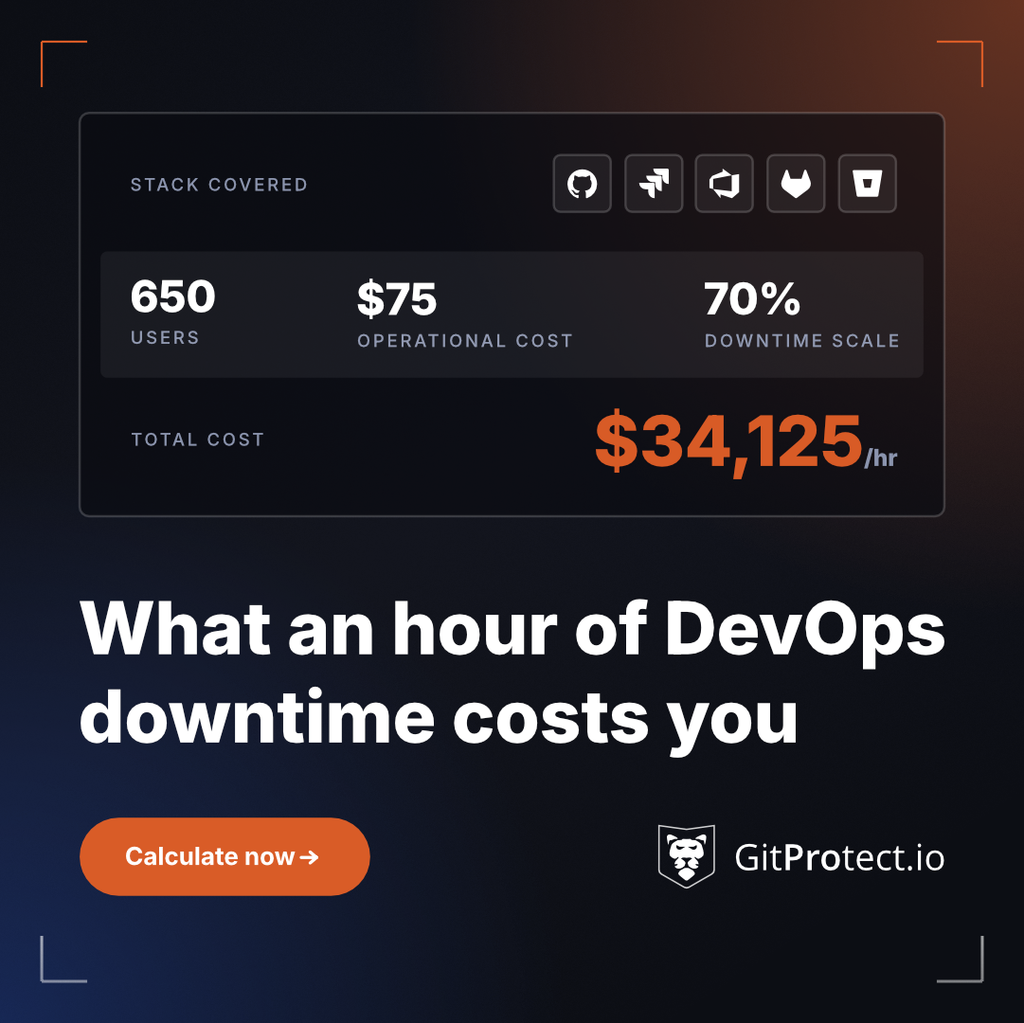
The arithmetic is unforgiving at scale. An engineering organization of 650 people, at an average loaded cost of $75 an hour, with 70% of daily work running through the affected platforms, loses just over $34,125 per hour. Direct productivity is only part of it. Delayed releases, SLA penalties, support load, and the recovery effort itself all arrive afterward.
Plan for the incident you cannot prevent
If an AI agent corrupted repositories across a dozen projects tonight, how long would it take until your teams were working again, and how much work would be permanently gone?
Teams that can answer it have done the work in advance. Their clean copy sits somewhere their platform credentials cannot reach, and they have restored from it recently enough to trust the recovery process. The rest will likely learn it the hard way, after an unexpected event occurs.
AI does not only write code faster. It breaks pipelines and corrupts data faster. When prevention fails against an autonomous agent, your ability to instantly recover your source code is your ultimate security measure.
And it is not something you assemble during an incident—it has to be in place before one starts.
Secure your source code with GitProtect
GitProtect secures your entire DevOps environment (metadata included) across GitHub, GitLab, Bitbucket, Azure DevOps, and Jira:
- immutable, air-gapped backups outside your platform,
- instant disaster recovery with point-in-time and granular recovery when you need a specific moment back,
- automated backup jobs running on a predefined or custom schedule,
- compliance with industry standards: ISO 27001, SOC 2 Type II, DORA, NIS2, and GDPR,
- restore verification, so you know it works before the day you depend on it,
- and many more features that build a cyber-resilient security posture.
🛡️ Don’t let a rogue AI agent wipe out your repository
Secure your source code with GitProtect—a trusted backup and disaster recovery provider. Protect your repositories with automated backups and restore your environment instantly, no matter what hits your pipeline.
👉 Try GitProtect for free or Book a custom demo