

Why Granular Backup And Recovery Are Essential for your DevOps backup strategy

Every IT stack may look tidy on a diagram. If so, then it’s tempting to assume everything works fine. And yet, systems rarely fail as a whole. Usually, it’s a part or functionality. For instance, anyone who ever untangled a broken workflow in GitHub, GitLab, Bitbucket or Azure DevOps, or a corrupted field in Jira, knows it too well. And that’s the quiet tension (“to fix one little thing”) inside every modern backup strategy.
Full backups are dependable. The problem is that they resemble a fire extinguisher. In other words, they are effective only if you plan to hose down the entire room. In DevOps environments like GitHub, GitLab, Bitbucket, and Azure DevOps, or project management ones, like Jira, the price organisations have to pay for restoring everything at once is a business disruption.
After all, teams using DevOps and PM platforms:
- ship code
- track changes
- run compliance records
- keep years of operational history.
In the meantime, most outages or user-induced incidents affect a single project, repo, issue type, permissions grid, or workload rule. Recreating or rebuilding the entire system for the sake of one broken element seems like overkill. Imagine replacing the whole engine because you’ve lost a spark plug.
Of course, it can be done. And yet, who would call it sound engineering? For this reason, granular backup and recovery became an operational requirement.
🔎 Get the facts on real DevOps risks — read GitProtect’s expert reports:
➡️ The CISO’s Guide to DevOps Threats
➡️ The State of DevOps Threats Report
The fragmentation problem in modern platforms
GitHub, as well as Bitbucket, Azure DevOps, GitLab, and Jira, are excellent examples here. Both illustrate two different sides of the same issue.
For example, Microsoft’s platform, GitHub, scatters critical objects across layers. These include repos, branches, tags, commits, pull requests, metadata, secrets, Actions workflows, and so on. It’s not up for debate that a failed Action workflow can stop deployment.
However, restoring the entire repo around it is excessive – at best. A deleted branch containing a long-running feature is the same story.
On the other hand, project management tools, like Atlassian’s Jira stores everything in a web of dependent structures:
- an issue type depends on fields and screens
- a workflow depends on transitions and validators
- a project depends on relationships and IDs, etc.
In turn, a minor misconfiguration can go cascading downhill. If so, then restoring a “point-in-time” for the entire instance sabotages the purpose of minimising downtime.
This leads to a straightforward conclusion. When incidents occur within these systems, then what matters the most is precision (not power).
Failure examples of granular restore must match with precision.
Considering failures in GitHub, GitLab, Bitbucket, Azure DevOps, or Jira, most of the time, they are a result of human error. It remains the most common cause of most IT incidents, including misplacement, misconfiguration, and schema modification.
In DevOps tools, it’s often something like this:
- a branch overwritten by a mis-merge
- an environment deleted by an over-confident maintainer
- a workflow was corrupted after someone edited YAML while half-awake
- a set of secrets removed during a cleanup.
As you can see, these are small areas of damage inside a larger, healthy environment.
Jira behaves similarly, but with a slightly different flavour. The failures usually appear as:
- a project whose screens, workflows, or fields no longer align
- a custom field was deleted despite being used in multiple issue types
- a workflow rule that now blocks transitions due to a misconfigured validator
- an issue hierarchy broken by a migration or a schema change
- an automation rule that triggers endless loops, and more.
Why granular recovery matters from a business perspective
Every… Well, almost every IT and technical decision maker follows a specific thought:
“Show me what this protects me from, and show me how much it saves.”
Granular recovery can address both expectations and more, including the human errors mentioned above.
Cost of downtime. When your team restores a whole environment, everyone is forced to wait. The more so that Git pipelines halt, Jira boards freeze, and all teams lose work done after the snapshot. But utilising granular restoration allows you to avoid such collateral damage by isolating the fix.
Compliance. Regulations care about “tys”: integrity, continuity, and auditability. And you can quickly realise that coarse restore is a liability. Especially, when your company is obliged to prove that only the affected database was changed and no other element was rolled back.
Only precise restoration gives auditors the detail they expect. All without putting down the whole “structure.”
Predictable recovery time. Granular recovery serves as a surgical tool. It’s targeted, contained, and measurable. In other words, you don’t have to estimate the process of restoring the whole and expecting unexpected events.
The reason why full backups are not enough anymore
A full backup copy is most useful when the entire service is unavailable or has become unstable. However, neither GitHub, GitLab, Bitbucket, Azure DevOps, nor Jira operates like monolithic servers, as was the case in the early 2000s. Their internal data structures operate around individually addressable components:
DevOps tools (GitHub)
Repositories → branches → commits → tags → metadata → workflows
→ environments → PRs → discussions → secrets
Jira
Projects → issue types → custom fields → screens → workflows → schemes
→ issues → comments → attachments → automation rules → configurations
Looking at it a bit deeper, a VPS or database backup doesn’t analyse or choose from these relationships. It simply restores a whole set. Yet, if your live instance has valid work performed after the backup, a full restore replaces that work with outdated information.
That’s why organisations need a restore process capable of understanding (differentiating) and isolating the exact component that failed. In addition, the more foldable, convenient, and safe this procedure is, the better. Especially when considering the time, costs, and efficiency aspects.
The latter raises a reasonable question: “Is there any tool available that matches and encapsulates such specific needs?”
The best tool for solving issues using granular backup and recovery
The IT market is full of software allowing you to manage full backups and related responsibilities. However, as was already mentioned, that’s not where most crises occur. The goal is to reach a single tool with the capability to treat (backup and restore) repos, branches, Actions, Jira projects, issue types, schemes, and similar components as separate restore targets.
Moreover, your backup tool should not only allow full backups of your GitHub, Bitbucket, GitLab, Azure DevOps, or Jira environment, but also provide granular backup options, so you can select specific projects or data to protect. Sometimes, you may only need to back up certain parts of your DevOps or project management ecosystem, depending on the criticality of the data. For example, highly critical data might require backups every few hours, while the rest of your environment can be backed up daily.
The world-recognized and most tech-savvy Backup and Recovery system for the DevOps stack is GitProtect.io. Among its many capabilities, this tool provides your team with granular backups of only selected data as well as instant rollback in the event of accidental deletion.
Holding onto the “granular” meaning, you can simply:
- backup your data at an expected and detailed level (granular backup)
- restore your backed-up data selectively and quickly (granular restore)
Adopting such a granular backup and recovery technology allows you to save time, storage, and significantly optimize costs compared to complete backup/restore cycles. At the same time, you can rely on every other aspect that defines a secure and reliable data backup and restore technology.
That means the GitProtect suite meets the demand for granular, cost-effective, compliant, and reliable recovery. All vital for modern DevOps environments.
It’s also worth remembering that GitHub, GitLab, Azure DevOps, Bitbucket, and even Jira offer their services based on the Shared Responsibility Model. In short, they secure their services, you protect your data.
Learn more about the shared responsibility model of the DevOps stack ecosystems:
📌 Shared Responsibility Model in GitHub
📌 Limited Liability Model in GitLab
📌 Atlassian Cloud Security Shared Responsibility Model
📌 Security responsibilities that a customer and Microsoft share in Azure DevOps
How granular backup and restore work in GitProtect
Granular backup with GitProtect
First, let’s look at how GitProtect can help organisations set granular backups for their DevOps environments to protect only selected data. As we already mentioned, an organisation might need it due to compliance requirements, or if some of the data needs more frequent backup than other data in the repository, for example.
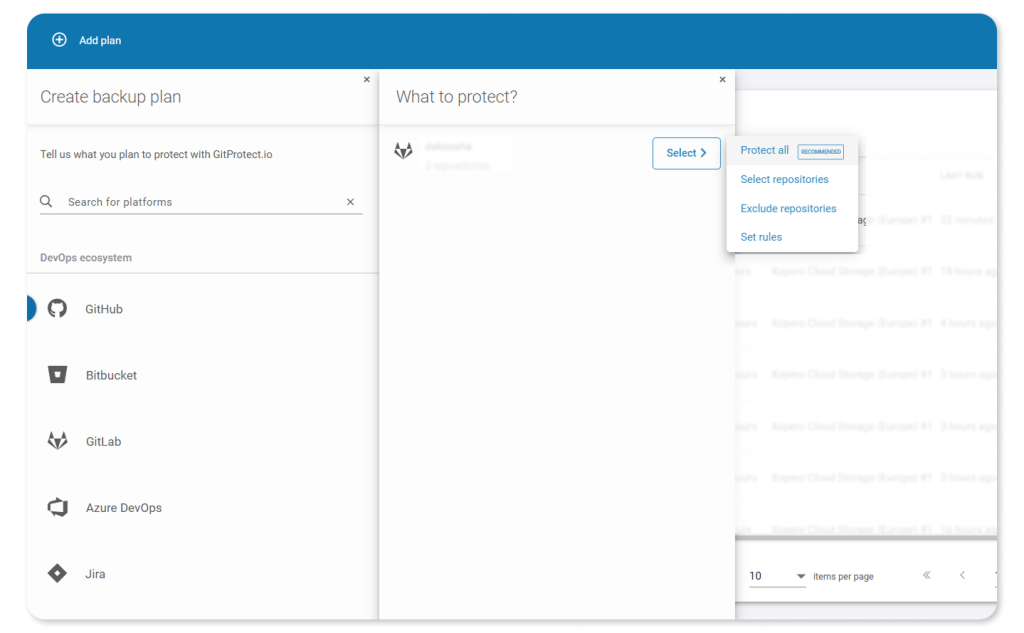
Granular backup with GitProtect.io
So, with GitProtect, protecting only selected repositories within your organisation is simple and flexible. The backup and disaster recovery software allows you to:
- Choose which repositories to protect — focus on the most critical projects in your DevOps environment.
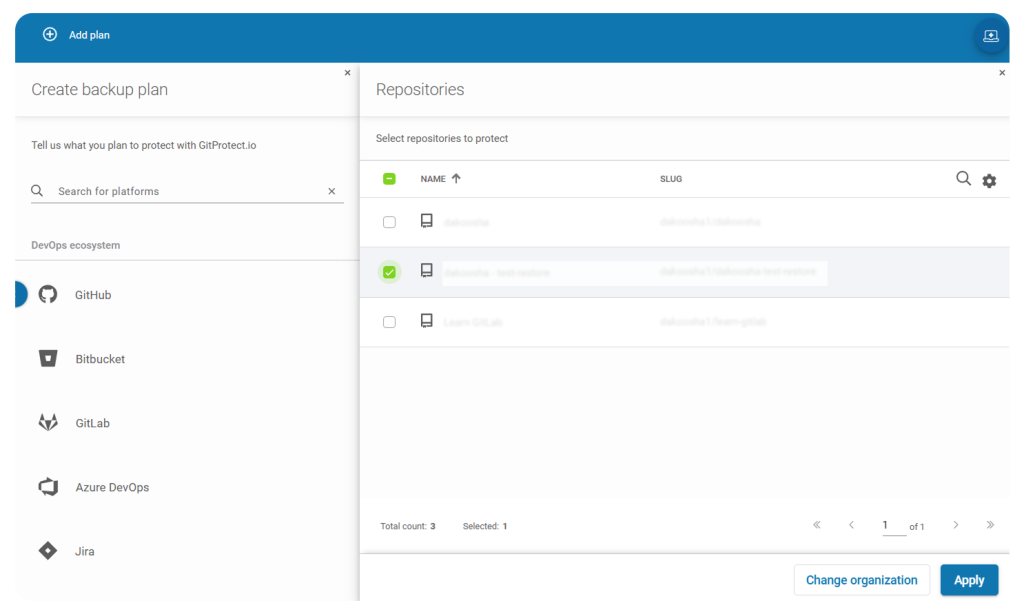
Granular backup with GitProtect — Choosing repositories to protect
- Exclude specific repositories — easily omit any repos you don’t want included in the backup.
- Set custom backup rules — define protection criteria based on repository name, group path, or other attributes; every new repository created within the DevOps environment that matches the set of rules will be automatically added to the backup plan. No manual adjustment needed.
- Protect all DevOps data — in case of a disaster, granularly restore only the specific data you need.
Moreover, regardless of whether you choose granular or full backups, you can always define which metadata should be included. GitProtect enables organizations to protect not only their repositories but also all critical associated metadata.

Granular backup with GitProtect.io — Protecting metadata
Granular restore with GitProtect
Let’s take a short, practical look at how the granular restore accuracy works in GitProtect. To keep the explanation grounded, here’s how teams typically use granular restore in practice.
- Locating the point in time
Admins open the backup timeline and pick the backup set that precedes the incident.
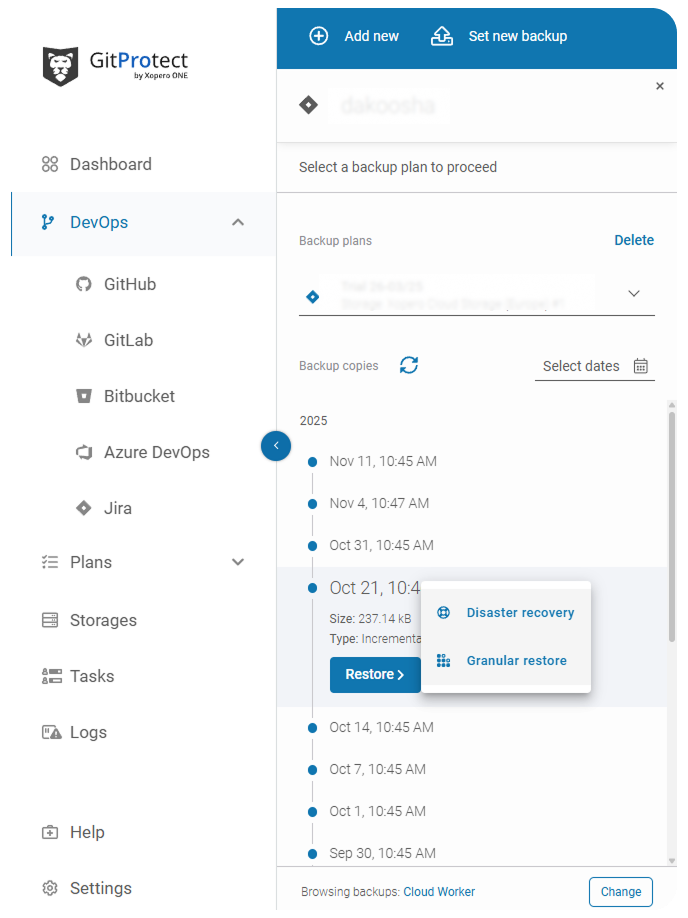
Granular restore with GitProtect — Point-in-time restore
- Selecting where to restore the data
This step determines where you need to restore your data. It can be the same organisation, the new one, or your local device. Moreover, when it comes to GitHub, Bitbucket, Azure DevOps and GitLab, with GitProtect, organizations can cross-over restore between platforms, e.g., restore from GitHub to GitLab.
“Our data recovery process is now highly precise, minimizing downtime and data loss during incidents. We can smoothly transition data across platforms, ensuring business continuity even in unexpected scenarios.“
— Kubilay Verboom, Cloud Engineer at SUE
📚 Read the full Success Story of how SUE adopted GitProtect backups to guarantee the organisation’s disaster recovery.
- Choosing what data to restore
At this stage, the admin can choose exactly which data to restore. In DevOps environments — GitHub, Bitbucket, GitLab, or Azure DevOps — you can select specific repositories and decide which metadata to include in the restore. For Jira, organizations can pick individual projects, issues, attachments, workflows, and other elements to recover, enabling precise, granular restoration without affecting the rest of the environment.
Looking at the bigger picture
The software and tech companies used to consider backups to be about volume. Precisely, it was about how much data you could save, how often, and how fast. Those days are gone for good. Nowadays, the real test is whether you can restore system elements to exactly where they were, and only to that exact location.
The primary reason, aside from time and resources, is that workflows, failures, and even the attack surface are fragmented. That means a backup strategy must match such a reality rather than fight it.
In this context, granular backup and restore can’t be viewed as an extra functionality. Practice shows that a granular approach is the difference between a week-long outage that erodes trust and a half-hour correction that barely shows up on the radar.
Once you see an incident within your system through that specific lens, the logic behind it becomes so painfully obvious. That is the big “why” precision is the new durability. In the end, organizations that treat it that way will be the ones who stay in full control when – not if – something breaks.
[FREE TRIAL] Protect your DevOps environment with a 14-day trial — ensure compliant backup and disaster recovery, and restore any piece of your data even in the event of accidental partial loss 🚀
[CUSTOM DEMO] See how GitProtect’s backup & DR software for DevOps can help you minimize risks and recover your data in minutes.