Cloud-to-Cloud Backup: How to Protect SaaS Data with an Independent Cloud

You’ve entrusted your Git and/or SaaS app data to popular cloud platform providers like GitLab, Atlassian, and Microsoft. But are you 100% sure about the data security, considering that your organization lives and dies by it? Do you have a backup and recovery plan? Or do you rely on your cloud provider only?
Get to know how to implement cloud-to-cloud backups to stay with the modern cloud technology, while giving your business-critical data in the cloud maximum protection.
The Myth of the ‘SaaS Safety Net’: Why Your Cloud Provider Is Not Your Backup Service
First of all, the provider is not responsible for your cloud data integrity. To understand it, you need to become aware of the idea of shared responsibility in the context of cloud computing. Under the so-called Shared Responsibility Model, cloud platforms enter into a special agreement with end users (like your organization) that defines who’s responsible for which aspects of cloud data protection. The common practice is as follows: the provider takes care of its infrastructure and service uptime, while you—of your account data. Full-stop.
Browse the GitProtect blog to learn how different cloud providers approach shared responsibility:
📌 Microsoft 365: What Are Your Duties Within The Shared Responsibility Model
📌 Shared Responsibility Model in Azure DevOps
📌 GitLab Shared Responsibility Model: A Guide to Collaborative Security
📌 Atlassian Cloud Shared Responsibility Model: Are you aware of your duties?
📌 GitHub Shared Responsibility Model and Source Code Protection
So, to make sure that your critical SaaS and DevOps data is protected and you keep up with the Shared Responsibility Model (or Limited Liability Model, as some providers call it), you need to build a reliable resilience plan. And backup is a critical part of it. Do service providers provide backups as a default option? No, as it’s your duty to take care of your data and its backups.
Which backup option to choose? You can go with native backup solutions service providers have (which usually require some additional costs), like Atlassian Backup and Recovery for Jira, or Microsoft 365 Backup. Alternatively, choose a third-party backup and disaster recovery (DR) solution.
If you go with the option to use native solutions, you should remember that they usually require you to host your data within their infrastructure. What does it mean for you and your data?
Keeping backups in the same ecosystem as your production data creates a single point of failure. Whatever happens to your provider’s infrastructure (service outage, cyber threats, etc.), you’re likely to lose access to your account data, as well as your backup, ending up with a business continuity failure.
Moreover, relying on a single vendor can be a security issue. If a user interface for managing backups is available directly from your SaaS app (like the Microsoft 365 Backup add-on in the Microsoft 365 Admin Center) or you can conveniently access it through Single Sign-On (SSO), then we’ve got the case of a ‘one login disaster.’ Once your credentials are compromised, there’s a high chance that cybercriminals will destroy both your production and backup data.
Finally, native backup solutions do have their limitations and may not support all your use cases. To mention just a few:
- There is limited data retention (often much less than 1 year), preventing you from reaching your compliance goals.
- There is no granular recovery option. In addition to the lack of flexibility, you must bear with excessive resource usage and disruption, as absolutely everything must be restored.
- No option to cross-migrate data to counter cloud outage and ensure your data resiliency.
- And more.
For a sample comparison of a native and a third-party backup solution, have a look at this blog article.
Pros and Cons of an Independent Cloud-Based Backup Storage
Before you jump right into implementing the idea of cloud-to-cloud backup to protect your precious data, learn about the advantages and disadvantages of choosing the cloud as your backup destination.
Advantages of Backing Up Business Data to Cloud
- Reduced operational overhead—you don’t bear the costs and effort to maintain hardware (buy, configure, update, patch, or decommission servers, switches, etc.).
- Access to modern technologies—key cloud storage providers like Amazon or Google invest a lot in the latest security and performance-related enhancements. For example, AWS S3 standard offers the immutable storage (Object Lock) feature that can protect you against ransomware.
- Robust security with redundancy—while it’s true the key players are still susceptible to cloud outages and disruptions, they have entire teams to take care of their infrastructure security and monitoring, plus regional deployments to ensure rapid recovery and redundancy.
- Compliance in the package—each big storage cloud provider offers comprehensive coverage of compliance standards like SOC2, GDPR, ISO27001, or HIPAA (see example compliance info for Backblaze), so you can become audit-proof from day 1.
- Less exfiltration points—there’s one main door to your cloud, the cloud API. With local storage, there are much more possibilities to get to backups. According to ReliaQuest’s Annual Cyber-Threat Report 2025, the most popular is Windows’ RDP with 26%. SSH/SMB/Windows admin shares constitute 14% of lateral movement paths. Still, there are more of them.
Disadvantages of Keeping Backup Data in the Cloud
- Your important data outside your organization—this one follows with problems such as: outages you don’t have control of and that may impact you; cloud provider’s hegemony (the mentioned Shared Responsibility Model); Internet Service Provider (ISP) and internet connectivity dependence; API throttling for large data moves that do happen during backups and restores.
- Backup identity hardening—identity is the main cloud security perimeter. Over 60% of cloud incidents relate to initial access, persistence, or credential theft, per the Elastic Security Labs’ Global Threat Report 2025. That’s why using strong multi-factor authentication (MFA), configuring access windows for admins, using IAM Deny policies preventing risky operations (e.g., moving data outside the organization’s account), etc., are definitely good ideas.
- Misconfiguration risks—continuing with identity management, you need to take extra care to properly configure access and action permissions. Also, data buckets (data containers) require proper setup to ensure data security and avoid situations when your backups are publicly available to anyone.
- Extra costs—when recovering data for disaster recovery purposes, you might get caught in the so-called egress fee trap. In other words, it’s a common practice for cloud platforms to charge you for taking your data out of the cloud. The cost of about $0.08/GB seems small, but it can spike if you need to restore terabytes of data. The costs can be further multiplied if you need to run test restores to comply with standards like SOC2 or HIPAA. To counter the problem, you can choose ‘zero-egress’ cloud backup destinations like Wasabi or Backblaze B2, for example.
How to Do Cloud-to-Cloud Backup Properly
Once you know what’s in for you, check out how to properly approach cloud-to-cloud backup, following some best practices.
To professionally run cloud-to-cloud backups, you’ll need a third-party cloud backup service or an app like GitProtect. Without it, the process will be manual and extremely time-consuming. The advanced technical nuances, like API-based access or throttling, will make it only harder for you.
Backup Your SaaS Data to an Independent Cloud
Just to reiterate: the cloud for backups must be different from your production cloud. For example, back up Microsoft 365 data to AWS or Wasabi cloud instead of using Azure Blob storage. Here are the reasons:
- Independence of your primary cloud provider and their problems (outages, active cyber threats, etc.) to ensure speedy data recovery (e.g., to a competitive cloud or on-premises) and business continuity.
- Compliance—backup data separation is required by information security standards and regulations, like, for example, SOC2.
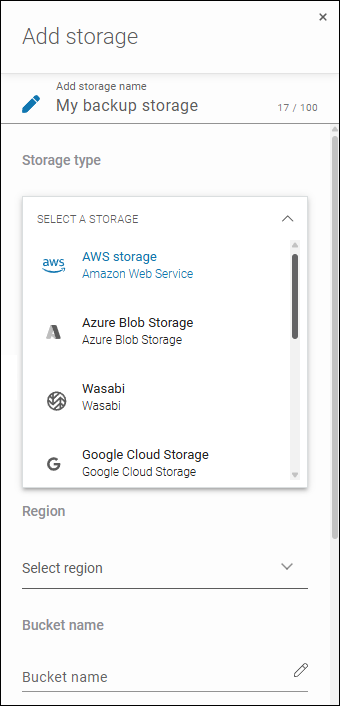
GitProtect supports cloud-to-cloud backup, enabling you to save copies to a cloud of your choice: Xopero Cloud Storage (private cloud you get for free with GitProtect), AWS, Azure, Google Cloud Platform, Wasabi, Backblaze, and any cloud compliant with the S3 standard. If you’ve already been using a given platform, just add it to GitProtect and then select it as a storage destination when defining your backup plan:
Automate Backups with Features Available in Your Backup Solution
Nowadays, with data growing exponentially, the manual approach to backups is no longer viable or effective. You simply can’t afford to run backups rarely and lose much data. Ideally, you should calculate Recovery Time Objective (RTO) and Recovery Point Objective (RPO) in advance to know how fast you can resume and how frequently to run backups.
But backup automation means more than just handling thousands of changes in your data and keeping copies up to date. It’s also important for performance-related reasons. Backups are known to be resource-intensive. With cloud-to-cloud backups, this is particularly the case because you need to take the throttling (resource limitation) imposed by each cloud provider into account.
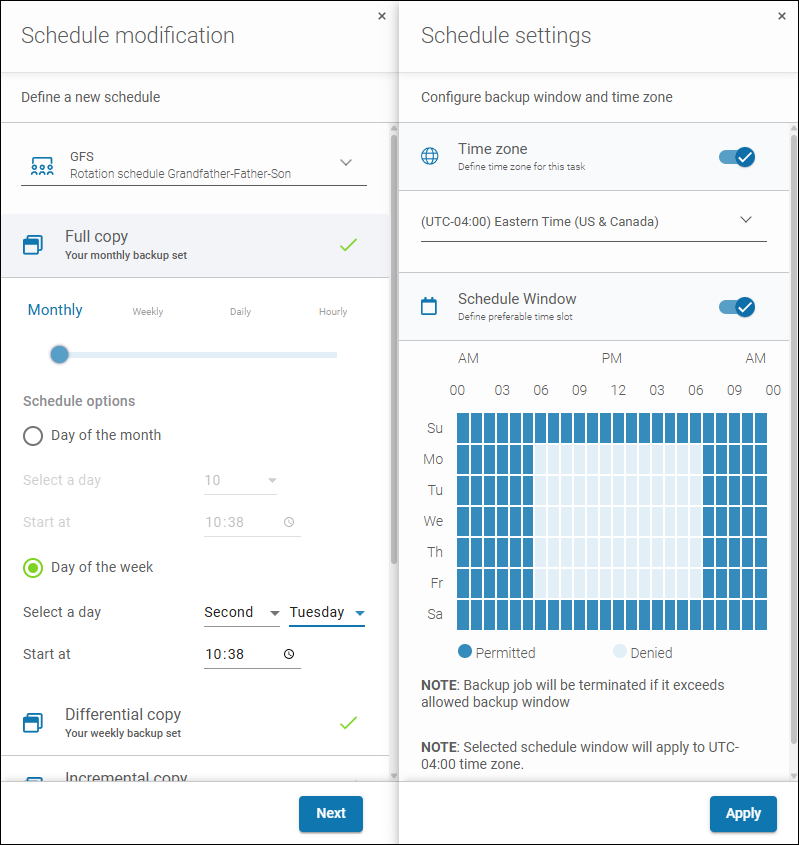
GitProtect addresses these needs. Its built-in scheduler allows you to choose days and hours to run full backups and incremental backups. You can also precisely define a backup window, e.g., for backups to run outside your working hours, when data in your production cloud isn’t constantly changing. You can further reduce the amount of backed-up data with the compression and deduplication features.
Ensure Maximum Security
Regardless of robust security measures advertised by cloud platform providers, you need to make sure for yourself that your cloud-to-cloud backup is secure… or even extra secure, taking contemporary sneaky and automated cyber threats into account.
To this end, check if your backup solution supports these features and set them up:
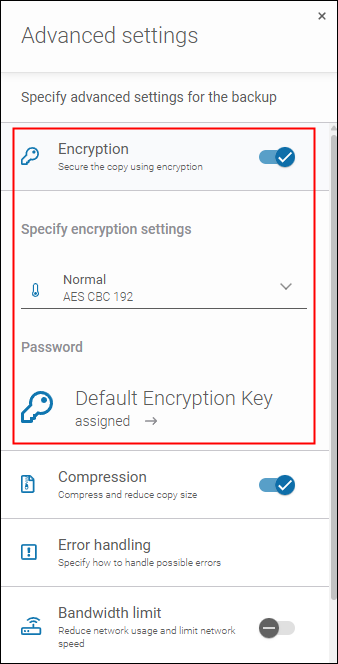
- Secure end-to-end encryption—while connections to public clouds are already protected from ‘man-in-the-middle’ attacks thanks to HTTPS (TLS) and/or the use of Private Links together with an intra-organization VPN, an extra layer of security should always be welcome. For example, encryption offered by a backup solution may cover more stages of the data lifecycle, i.e., not only the cloud-to-cloud transfer but also the stages of reading source data and storing backed-up data.
- Data non-executability—some backup solutions may offer the feature of rendering executable files non-executable. This prevents ransomware from running them within a copy.
- Data immutability—this one protects copies from tampering by ransomware that’s actively exploring the organization’s resources to destroy backups and production data. To work, both a backup solution and storage must support this technology.
While many backup solutions offer these security features, organizations often neglect to use them. According to the EON survey of 154 IT and cloud leaders, 57% of organizations rely just on a single layer of security to protect their cloud backups from ransomware, while 13% have no ransomware protection at all.
GitProtect supports the security technologies in question and compatible clouds to offer maximum protection out-of-the-box. If you want to ensure the optimal protection of data stored in the cloud, enable the appropriate settings when you define your backup plan.
Harden Backup Admin Identity
Identity is the security perimeter for the cloud. The same is true for cloud-to-cloud backups. That’s why it’s highly important to create well-secured backup admin accounts for source and target clouds, following these principles:
- The backup admin accounts must be independent of other admin accounts—don’t share admin roles or credentials. Otherwise, cybercriminals will be able to access both your production and backup data, rendering your backup efforts useless.
- Take your time to ensure secure identity configuration—implement MFA, admin access windows (if available), use IAM or role-based access (RBAC) policies, etc.
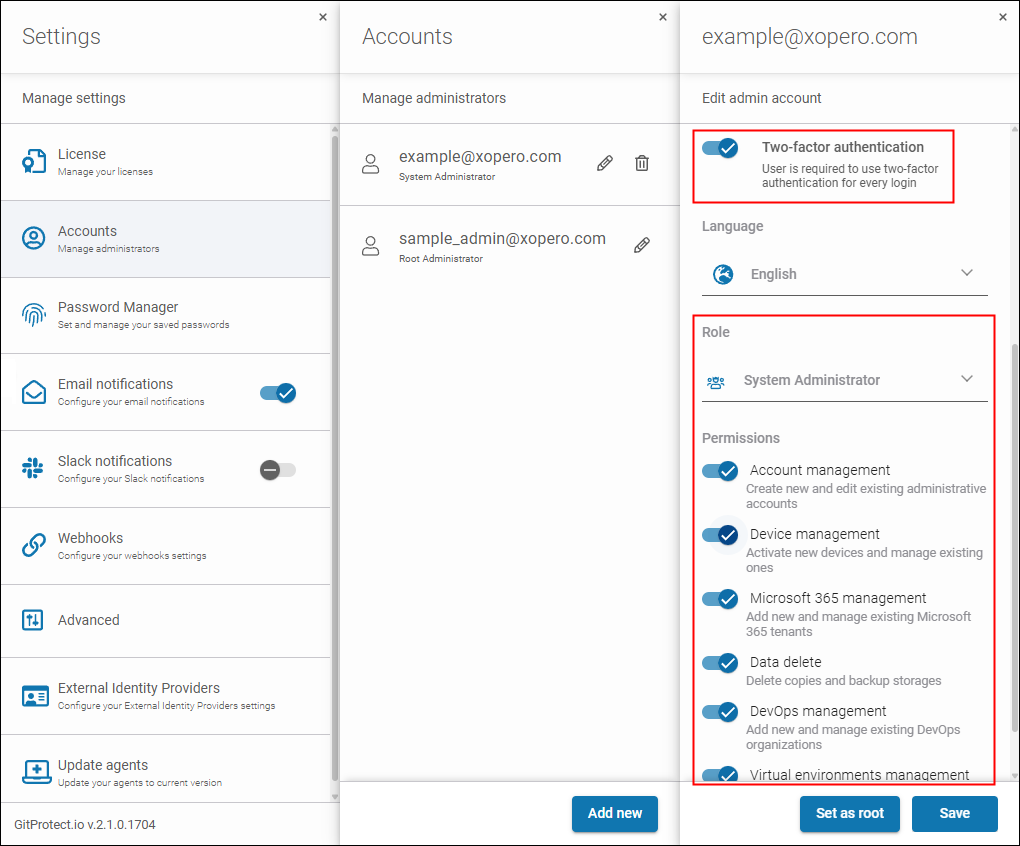
In addition to native cloud security measures, you can use GitProtect’s identity hardening features, MFA and RBAC, to greatly limit access to our solution’s backup console.
Build Sovereignty and Outage-Resilience
Despite robust security, popular cloud services still face outages and service disruptions. In 2024, popular DevOps cloud platforms experienced 955 hours of disruptions and 498 major incidents in total. That’s why building data sovereignty and resilience is critical if you want to avoid downtime and loss related to disrupted production. There are a few ways to do it:
- Replicate backups—even if your backed-up SaaS cloud and the cloud where you keep backups go down (unlikely when you diversify them, but still possible), you’ll be able to access your data and use it somehow. There are backup rules like 3-2-1 or more recent 3-2-1-1-0 and 4-3-2 that presume keeping 3 or more copies in several locations. Following them is definitely a good idea.
- Ensure you can cross-migrate—backup solutions compatible with multiple workloads and storage locations can support the cross-migration use cases. For example, when GitHub is down, you can cross-migrate your code and dependencies to Bitbucket to continue production even during a prolonged outage.
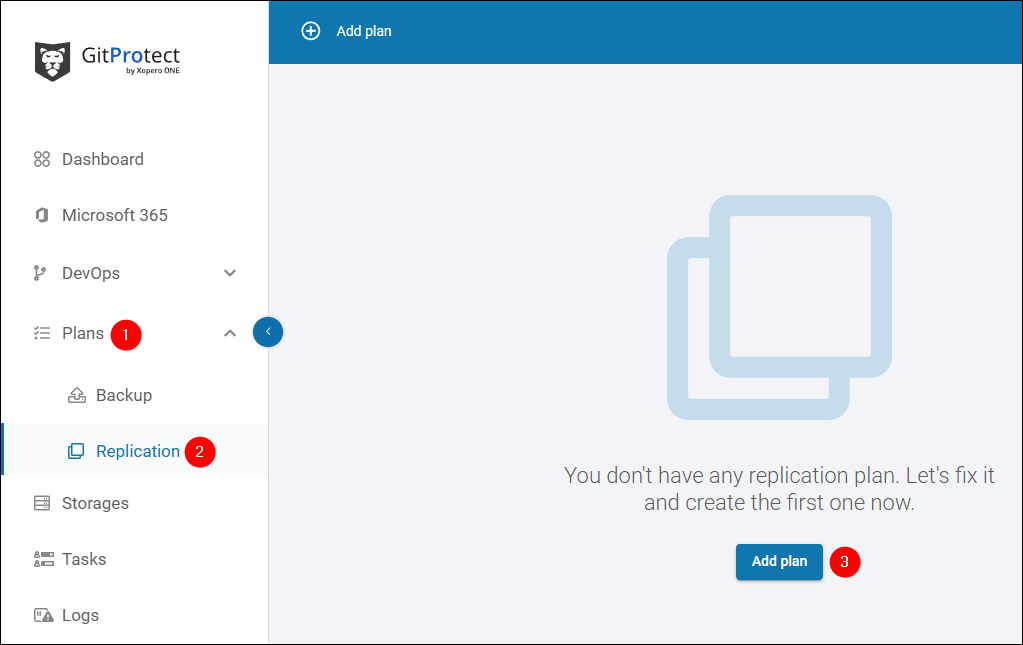
With GitProtect, you can build a resilient and sovereign ecosystem through backup replication and flexible cross-migration capabilities.
Overcome Limitations
Keeping data remotely has certain limitations. You depend on your Internet Service Provider (ISP) and internet connectivity, especially when it comes to accessing backup contents and recovering data. In this regard, companies often secure emergency internet access from another ISP.
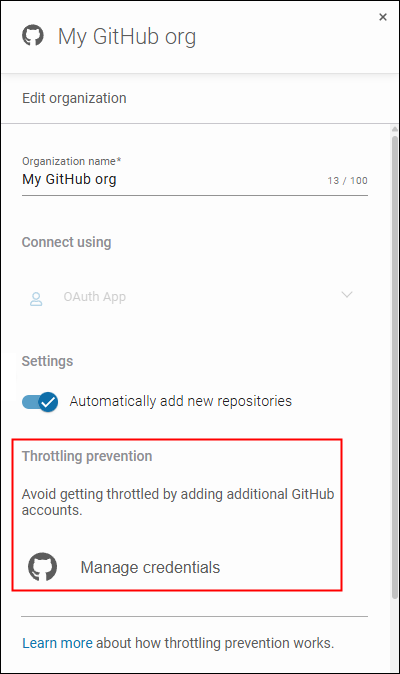
However, the most painful limitation is often API throttling. To run backups, backup software needs to interact with the Application Programming Interface (API) of your backed-up cloud and the cloud serving as the backup storage. The interactions involve thousands of requests to read or write data, check what’s changed, etc. When API limits are exceeded, backup operations may slow down considerably or ‘fail silently’ due to the throttling.
To overcome API throttling of providers like Atlassian or Microsoft, GitProtect employs multiple mechanisms, such as using multiple accounts to call the API, intelligent retries, or smart scheduling.
GitProtect For Seamless and Flexible Cloud-to-Cloud Backup
If you’re a cloud-first company or want to increase your cloud footprint, GitProtect.io can be your dedicated backup solution.
Thanks to support for DevOps and SaaS workloads modern businesses depend on (GitHub, Azure DevOps, GitLab, Bitbucket, Jira, Microsoft 365) and popular cloud storage locations, GitProtect can be your go-to solution that protects your entire toolset. The implemented features make it a professional, secure, and convenient tool, too.
If you’re looking for a way to protect business-critical data against modern threats with the cloud-to-cloud approach, we encourage you to visit GitProtect.io to meet the product in full. You can self-trial GitProtect without limits for free for 14 days. And if you need a customized approach and protection, we can help you make the right decisions thanks to our +17 years of experience in the backup industry.