GitHub backup testing and verification best practices

Backups are as good as the testing carried out to check effectiveness. Key aspects to consider when verifying GitHub backup effectiveness include:
👉 Has all data been covered and successfully backed up?
👉 Is the frequency of backup appropriate?
👉 Are recovery procedures correctly implemented?
Read on as we shed more light on testing GitHub backups. Find out more about backup testing best practices, the issues that may arise, how to address them and why backup verification is so important. Dive in to ensure your backups are working effectively.
What is an effective backup?
An effective and ‘working’ GitHub backup must check a few boxes in order to be deemed verified to use. It must be complete, meaning all required data – such as repositories, commit history, pull requests, issues, and workflows – is included. It must also be consistent, with no corruption, missing commits, or discrepancies between the source and the backup.
Beyond that, a backup must be restorable, allowing data to be recovered at both granular and larger scales, and recoverable, meaning that restore operations work reliably within expected timeframes and under real-world conditions.
To validate these conditions, organizations must clearly define their backup scope, select appropriate restore test types, and establish measurable pass criteria.
Why backups must be tested
Proper verification of backups is essential, as numerous factors affect backup testing. If backups are not tested correctly, they may fail to provide the required recovery capabilities. In GitHub environments, this can mean missing repositories, incomplete metadata, or restore processes that do not work as expected.
👉 These key factors make backup testing essential:
- Compliance: Many regulatory frameworks require organizations to prove that backups are not only created but also tested regularly. Without documented restore tests, backups may not meet audit requirements.
- Disaster recovery readiness: Testing ensures that repositories, workflows, and related data can be restored within the required timeframe. Without validation, recovery procedures remain unproven and unreliable.
- Data integrity: Backup testing verifies that commit history is intact, file contents are accurate, and no corruption or missing data has occurred within repositories.
- Metadata coverage: GitHub data goes beyond code. Testing confirms that pull requests, issues, comments, and other metadata are included in backups and available after restoration.
- Recovery validation: Testing proves that restore processes actually work, both at a granular level (files, commits, repositories) and at a larger scale when multiple repositories must be recovered.
- Early detection of errors: Regular testing helps identify issues such as incomplete backups, permission problems, or failed jobs before they impact real recovery scenarios.
Common issues uncovered during GitHub backup testing
GitHub backup testing often reveals problems that are not visible from backup job status alone. In GitHub environments, these issues usually appear when repositories, commit history, pull requests, issues, or Actions workflows are compared against restored data.
See the table below to find most common problems, how they can be detected through testing, and why they matter for GitHub recovery.
| Issue | How its detected with testing | Why its significant |
| Corrupted backup data | Run a restore test. Compare the restored repository, commit history, and file contents with the source. Review restore logs for failed transfer or reconstruction errors. | A backup that cannot be restored correctly is unusable during recovery. |
| Incomplete backup data | Compare the backup scope against the GitHub source environment, including repositories, branches, tags, pull requests, issues, and workflows. | Missing data creates recovery gaps and can prevent full restoration of the GitHub environment. |
| Permission inconsistencies | Validate access and usability in the restored environment by checking whether restored repositories and metadata can be accessed as expected. | Even if data is restored, broken permissions can make it difficult or impossible to use. |
| Recovery delays | Measure restore duration for different repository sizes and multi-repository scenarios, then compare the results against expected recovery targets. | Slow recovery may prevent the organization from meeting its RTO. |
| Testing in production | Review where restore tests are performed and confirm whether validation takes place in an isolated target rather than a live environment. | Restore validation in production can disrupt live systems or introduce inconsistencies. |
| Inconsistent documentation | Check whether every test includes logs, timestamps, outcomes, restore duration, and issue notes. | Missing evidence makes it difficult to prove compliance or identify recurring failures. |
While these issues may seem operational at first glance, their impact in GitHub is very specific. A backup may complete successfully and still fail to restore the repositories, metadata, and workflows that development teams rely on every day. That is why GitHub backup testing must go beyond job status and verify whether the restored environment is complete, usable, and recoverable under real conditions.
Potential real-world GitHub backup scenarios
GitHub backup testing should reflect the kinds of incidents that can compromise repositories, metadata, or workflows in live environments. This includes force pushes that overwrite commit history, accidental or malicious repository deletions, compromised tokens that enable unauthorized changes, deleted GitHub Actions workflows, and misconfigurations that affect important data. Backup testing should also account for platform and API-related limitations, since rate limits or failed jobs can result in incomplete backups even when backup jobs appear successful.
RTO and RPO also help pressure test backup effectiveness. RPO shows whether backups run frequently enough to limit acceptable GitHub data loss, while RTO shows whether repositories, metadata, and workflows can be recovered quickly enough when an incident occurs.
GitHub backup testing best practices
Once the scope, risks, and common failure points are clear, the next step is to build a repeatable GitHub backup testing process. The goal is not to confirm that backup jobs ran, but to verify that GitHub data is complete, usable, and recoverable under real conditions.
Define backup scope
Start by documenting exactly what should be protected and later verified. In GitHub, that typically includes repositories, branches, tags, pull requests, comments, issues, issue metadata, GitHub Actions workflows, and releases. Export the list of repositories from the GitHub organization through the UI or API, then compare that inventory with the actual coverage of the backup solution. This creates a documented scope that defines what testing must validate.
Classify GitHub assets by criticality
Not all repositories carry the same operational weight, so testing should reflect business impact. Group repositories into tiers, for example: Tier 1 for production repositories, infrastructure-as-code, and core GitHub Actions workflows; Tier 2 for internal tools and staging repositories; and Tier 3 for archived or lower-impact assets. Use these tiers to define backup frequency and restore testing cadence, so critical GitHub data is validated more often than low-priority content.
Select restore types required in your organization
Backup testing should reflect the kinds of recovery the organization may actually need. Depending on the GitHub environment, this may include single-repository restore, file- or commit-level restore, pull request and issue recovery, or broader organization-level restore. Defining restore types up front prevents testing from becoming generic and guarantees it stays aligned with real operational requirements.
Define pass criteria
Every backup test should have measurable success conditions. In GitHub, this means confirming that repository structure matches the source, branches and tags are present, commit history is intact, and pull requests, issues, comments, and workflows are restored as expected within the supported scope. Pass criteria should also include timing and data freshness requirements, such as backup gaps remaining within RPO and restore duration staying within RTO.
Verify backup coverage
Do not assume that a successful backup job means full protection. Compare the number of repositories in GitHub with the number included in backup records. Review logs for skipped repositories, API rate limit issues, and token or authentication failures. Identify repositories or supported GitHub objects that were never backed up. If the backup does not match the defined scope, coverage is incomplete.
Inspect backup contents
Coverage is only the first layer. Teams should also verify that the actual backup contents are complete and correct. Select repositories from different tiers and compare backed-up data with the source, including commit history, branches, tags, pull requests, issues, and other required metadata. Where applicable, validate workflow-related data as well. This step helps expose silent gaps that job status alone will not reveal.
Test granular restore
Granular restore testing proves whether the backup can support targeted recovery. Use a sandbox or test repository, simulate a small change or deletion, and attempt to restore a single file, a specific commit, or an individual repository element. Then verify that the restored content is accurate and usable. Since many GitHub incidents do not require full-scale recovery, granular restore testing is essential.
Test large-scale restore
Granular testing is not enough on its own. Teams should also validate whether recovery works across multiple critical repositories or a broader GitHub scope. Restore several Tier 1 repositories into a new organization or isolated environment, then verify repository structure, data consistency, and relationships between restored components. This helps confirm whether backup recovery still works when the scope becomes operationally significant.
Test against real-world GitHub scenarios
Testing should reflect the types of incidents GitHub environments actually face. Validation drills can include repository deletion, force pushes that overwrite history, deleted GitHub Actions workflows, misconfigurations, compromised tokens that enable destructive changes, or API-related failures that result in incomplete backup coverage. The purpose is to test backup effectiveness against realistic GitHub failure patterns rather than idealized conditions.
Measure actual restore time
Recovery speed should be measured during testing, not assumed in advance. Track the time from restore start to the point where the repository and related GitHub data are actually usable again. Measure this across small repositories, larger repositories, and bulk restore scenarios, then compare the results with the organization’s RTO expectations. This is how teams confirm whether recovery is practical under pressure.
Document and standardize testing
Testing only becomes reliable when it is documented in a repeatable way. Each test should record what was tested, when it was performed, what restore type was used, whether the test passed or failed, how long it took, and which issues were discovered. Teams should gradually turn this into standardized checklists or runbooks so backup verification is consistent, auditable, and easier to repeat.
Automate and repeat testing
Manual restore testing is often irregular and easy to postpone. Mature GitHub backup verification programs schedule regular restore tests, monitor failures and skipped jobs, and configure alerts for anomalies. Automation does not replace human review, but it ensures that backup testing happens often enough to remain meaningful.
Continuous improvement
GitHub backup testing should evolve along with the environment it protects. As repositories change, workflows expand, and business priorities shift, testing scope, frequency, pass criteria, and restore procedures should be reviewed and refined. Failed or incomplete tests should be treated as input for improving the overall process rather than as isolated technical events.
Step by step backup testing with GitProtect
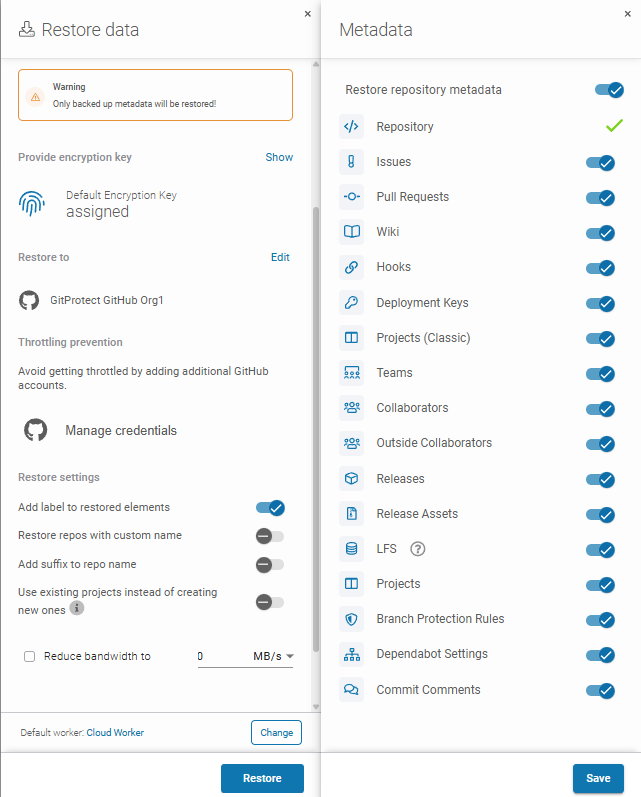
When using third-party backup tools, there are simple ways to test and verify your backups. In GitProtect for instance, in your dashboard, go to DevOps, then select your organization (GitHub), and hit Restore.
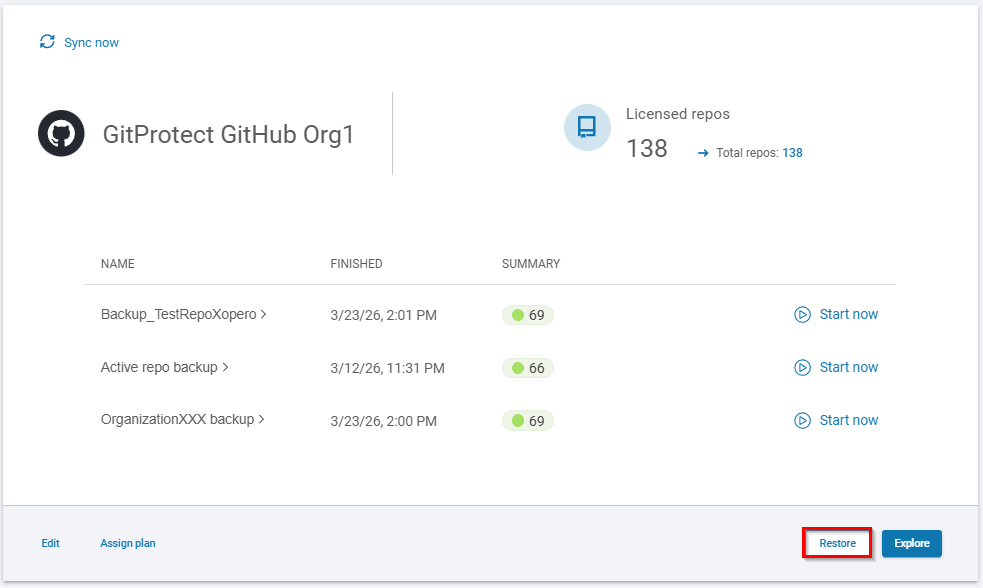
Next, select resources that you would like to restore.

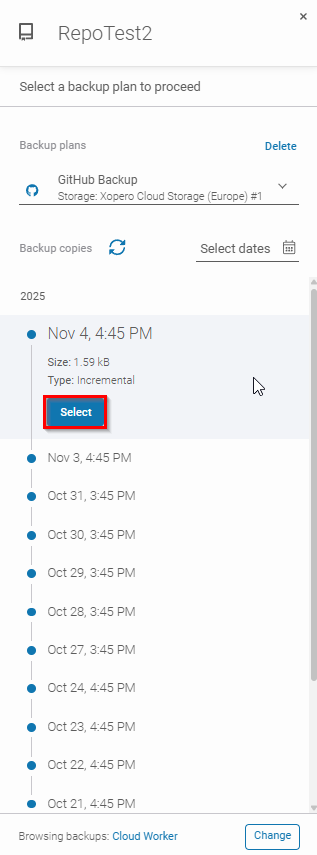
Here you can select the plan and specify a point in time of the backup.
Then, choose the restore destination.
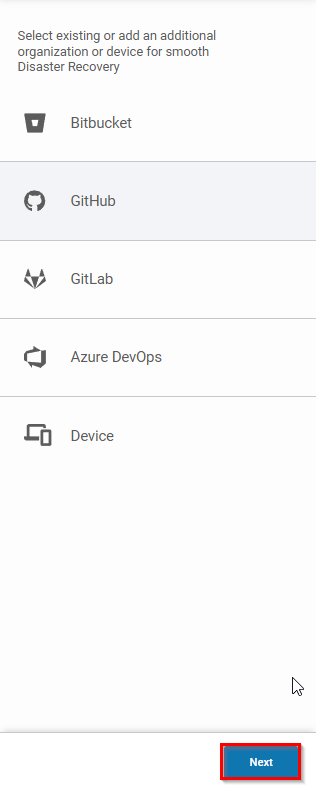
Finally, select the metadata that you restore alongside the repository and you are officially done.
👉 See this article to learn about Disaster Recovery testing!