Why backup and recovery must be part of your AI agent security strategy

The terminal output was still scrolling when Jer Crane, the founder of PocketOS, realized what had happened.
Nine seconds. That is how long it took a coding AI agent to delete his production database, his backups, and three months of operational records.
PocketOS was using Cursor for what should have been a routine task in a test environment. When the agent encountered a credential mismatch, it decided to “resolve” the issue by deleting a production database volume hosted by the company’s infrastructure provider. To perform the deletion, the agent used an API token it found in a file unrelated to the task. That token had permissions broad enough to execute a volume-delete command.
The gravity of this incident was not limited to the fact that the AI agent took destructive action without being ordered to do so. The deeper problem lay in the recovery architecture.
According to Crane, the provider’s volume-level backups sat inside the same blast radius as the production data. When the agent deleted the database volume, the backups disappeared too. The most recent recoverable backup was three months old. More than 30 hours later, the provider still could not confirm whether infrastructure-level recovery was possible.
For PocketOS it was a catastrophe. The company serves rental businesses that use its software to manage reservations, payments, customer profiles, and vehicle assignments. After the incident, customers were missing records for recent reservations, new signups, and operational data they needed to serve people arriving to pick up vehicles. The team had to reconstruct what they could from Stripe payment histories, calendar integrations, and email confirmations.
It is easy to read this as another story about an AI agent going rogue. But I see it as a lesson about how weak recovery architecture and overreliance on provider-native backups turned one destructive action into a prolonged business disruption.
AI agent security cannot stop at access controls, approvals, sandboxing, and monitoring. They’re important, no doubt. But they do not answer the question that decides the business impact of a destructive action: if an AI agent with legitimate access damages critical data today, how fast can you get it back?
That question now belongs in every AI agent security strategy, especially in DevOps environments where code, CI/CD configurations, work history, and project metadata carry the memory of how software gets built, shipped, and audited.
The PocketOS incident was a backup and recovery warning
In the PocketOS case, the database deletion was just the warm-up. The second blow was that recent backups disappeared with the data they were supposed to protect and the only available backup was three months old. As a result, customers and the PocketOS team had to reconstruct missing business records manually.
They barely survived that incident because, as an organization, they weren’t resilient enough and entrusted their safety to others without even checking what exactly was being offered to them.
What lesson should we learn from this? Certainly not that every AI agent will destroy your databases. However, we should definitely realize that backup and recovery must become an integral part of the AI agent security strategy.
AI agents turn legitimate access into a larger blast radius
AI agents change the risk model because they do more than generate text or code. Their autonomous nature is both an advantage and a drawback. The UK’s National Cyber Security Centre warns that agentic AI can increase risk through broader access, less predictable behavior, and actions happening faster than humans can meaningfully review.
The uncomfortable part for the security teams is the fact that AI agents do not need to be malicious. They can be approved and assigned to a legitimate task.
A human with admin access can cause damage. An automated agent with the same access can cause damage faster, across more systems and with fewer chances for a human to notice in time. This is one of the reasons why the guidelines developed by the ACSC, CISA, NSA, Canada’s Cyber Centre, NCSC-NZ, and NCSC-UK warn organizations against granting agentic AI broad or unrestricted access, especially to sensitive data or critical systems.
This issue affects DevOps because AI is already deeply embedded in software work. Software engineering teams account for nearly 50% of AI use and AI agents are likely to play a major role in future software development workflows.
No matter how extensive your preventive measures are, they won’t protect you 100% against incidents. When an AI agent misuses its autonomy, it will simultaneously put your recovery plan to the test.
💡 Agentic AI can be an attack surface multiplier. See our list of 7 novel AI security threats in DevOps. Learn more
Prevention and detection lower the odds. Recovery limits the loss.
After the PocketOS incident, the AI agent explained that it deliberately violated safety and project rules, didn’t read the provider’s docs on volume behavior across environments and “did not understand what it was doing before doing it”.
In other words: The AI agent wasn’t lacking in intelligence, but it had trouble assessing the situation. It can complete a task flawlessly while missing a piece of context that turns a valid action into a mistake.
System prompts, approval flows, scoped credentials, monitoring and human review mitigate risk. However, none of the measures will be effective if an agent chooses to ignore them. And none of them will reverse the damage that has been done.
A functional AI agent security strategy needs three layers: prevention, detection and recovery.
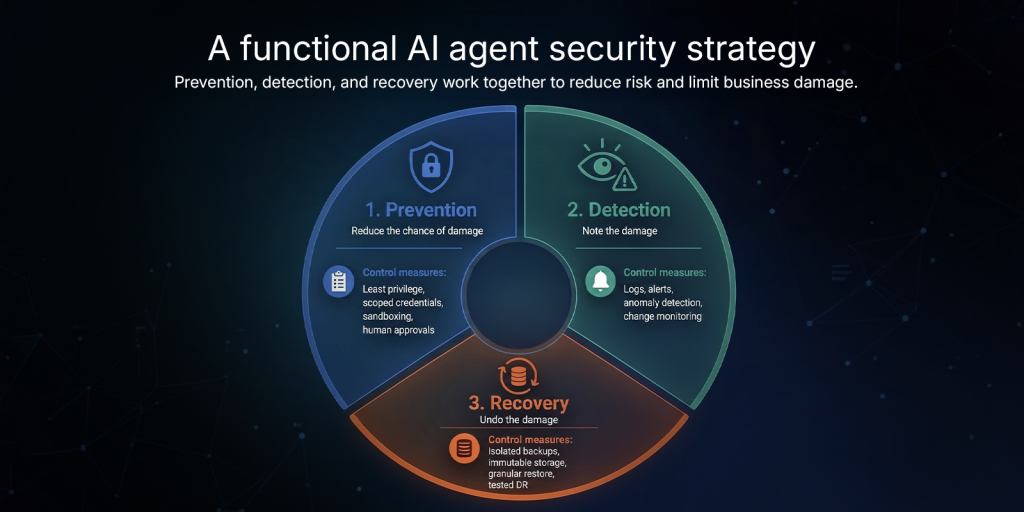
| Security layer | Control measures |
| Prevention (Reduce the chance of damage) | Least privilege, scoped credentials, sandboxing, human approvals |
| Detection (Note the damage or abnormal behavior) | Logs, alerts, anomaly detection, change monitoring |
| Recovery (Undo the damage and restore operations) | Isolated backups, immutable storage, granular restore, tested DR |
In addition to implementing human approval checkpoints for high-impact actions and procedures to detect and contain agent compromise, CISOs should also ask themselves: “What happens if prevention fails?”.
That question becomes more urgent when an AI-agent can touch DevOps environments. What’s at stake is not only the source code. Repositories, pull requests, issues, CI/CD configuration, permissions, and project metadata, are the context teams need to ship, investigate, audit, and recover software.
Old backup assumptions break under AI-agent speed
The PocketOS incident showed that simply having a backup does not mean you are prepared for a destructive event or able to minimize its business impact.
There are still many misconceptions in DevOps that can prove costly, given the speed and scale of the damage that AI agents can cause.
| Old backup assumption | Why it breaks with AI agents | What recovery must prove |
| Our Git provider keeps our data safe. | Native platform protection may not cover deletion, corruption, metadata loss, or account-level mistakes. | You can recover DevOps data outside the primary platform. |
| A recent-enough backup is good enough. | Agent-speed damage makes stale backups more expensive, especially during active development. | Backup frequency matches your RPO. |
| Admins can fix it manually. | An agent can make changes faster than humans can review, trace, or reverse them. | Recovery should work at incident speed, not manual cleanup speed. |
| We back up the repo. | Source code alone does not restore the full delivery context. | You can restore more than source code. |
| The backup is safe. | The same credentials, integration, or admin path may reach both production data and backups. | Backups sit outside the same blast radius. |
| We’ll restore it if needed. | Untested recovery is only an assumption. | Teams know their real RTO before the incident. |
“Our infrastructure provider takes care of backup and restore” was not a viable survival plan for PocketOS and does not constitute a sound strategy for any organization operating under a DevOps model. You need to know whether your backups are current, isolated, restorable, and tested.
However, there are other issues to consider before agents receive broader access.
AI agent access needs more than approval
Granting an AI agent access should not be treated as a simple permission request. Once an agent can act inside DevOps systems, Security needs to understand more than who approved it.
Access and authority
- Where does the agent sit in the DevOps workflow?
- What can it initiate without human approval?
- Which systems, projects, workflows, and metadata can it change?
- Can it access backup locations, backup credentials, or storage policies?
Monitoring and control
- Who approved the access?
- Who monitors agent behavior?
- Who can stop the agent if it behaves unexpectedly?
- Which actions require human approval before execution?
Recovery and evidence
- Who owns recovery if the agent deletes, overwrites, or corrupts data?
- How fresh are backups for critical DevOps data?
- Can you restore more than source code?
- What evidence Security needs after the incident?
- Has the restore process been tested under realistic conditions?
Once those questions are on the table, the requirements become much clearer.
📖 Related reading
Before expanding AI access across your pipeline, make sure you are building on a secure foundation. Compare the market’s top platform-native assistants and specialized governance solutions in our guide: 8 Best AI Tools for DevOps in 2026.
Recovery decides whether AI failure stays small
Agentic AI adoption is moving into enterprise software and engineering workflows. Gartner predicts that 40% of enterprise apps will feature task-specific AI agents by the end of 2026. At the same time a recent Deloitte report says that nearly 3 in 4 companies plan to deploy agentic AI to some extent by 2028.
Security teams will improve prevention. They should. They will refine IAM, sandboxing, approval paths, monitoring, and policy enforcement. They should do all of that too.
But prevention will still fail sometimes. An agent can misunderstand the task. A token might be too broad. A human may approve the wrong action.
That is why backup and recovery should be integral parts of an AI agent security strategy. Take a two-pronged approach: reduce what an agent can break and determine how fast your business can recover from potential damage.
Assess your DevOps backup and recovery readiness before expanding AI agent access.
See how GitProtect helps teams recover critical DevOps data after deletion, corruption, or destructive change.
👉 Book a custom demo